Running Teams
Execute teams with Team.run() and process their output.
Run your team with Team.run() (sync) or Team.arun() (async).
Basic Execution
from agno.team import Team
from agno.agent import Agent
from agno.models.openai import OpenAIResponses
from agno.run.team import TeamRunEvent
from agno.tools.hackernews import HackerNewsTools
from agno.tools.yfinance import YFinanceTools

news_agent = Agent(name="News Agent", role="Get tech news", tools=[HackerNewsTools()])
finance_agent = Agent(name="Finance Agent", role="Get stock data", tools=[YFinanceTools()])

team = Team(
    name="Research Team",
    members=[news_agent, finance_agent],
    model=OpenAIResponses(id="gpt-5.4-mini")
)

# Run and get response
response = team.run("What are the trending AI stories?")
print(response.content)

# Run with streaming
stream = team.run("What are the trending AI stories?", stream=True)
for event in stream:
    if event.event == TeamRunEvent.run_content and event.content:
        print(event.content, end="", flush=True)
Run the example
Set up your virtual environment
uv venv --python 3.12
source .venv/bin/activate
Install dependencies
uv pip install -U agno openai yfinanceExport your OpenAI API key
export OPENAI_API_KEY="your_openai_api_key_here"Run the example
Save the code as running_team.py, then run:
python running_team.pyExecution Flow
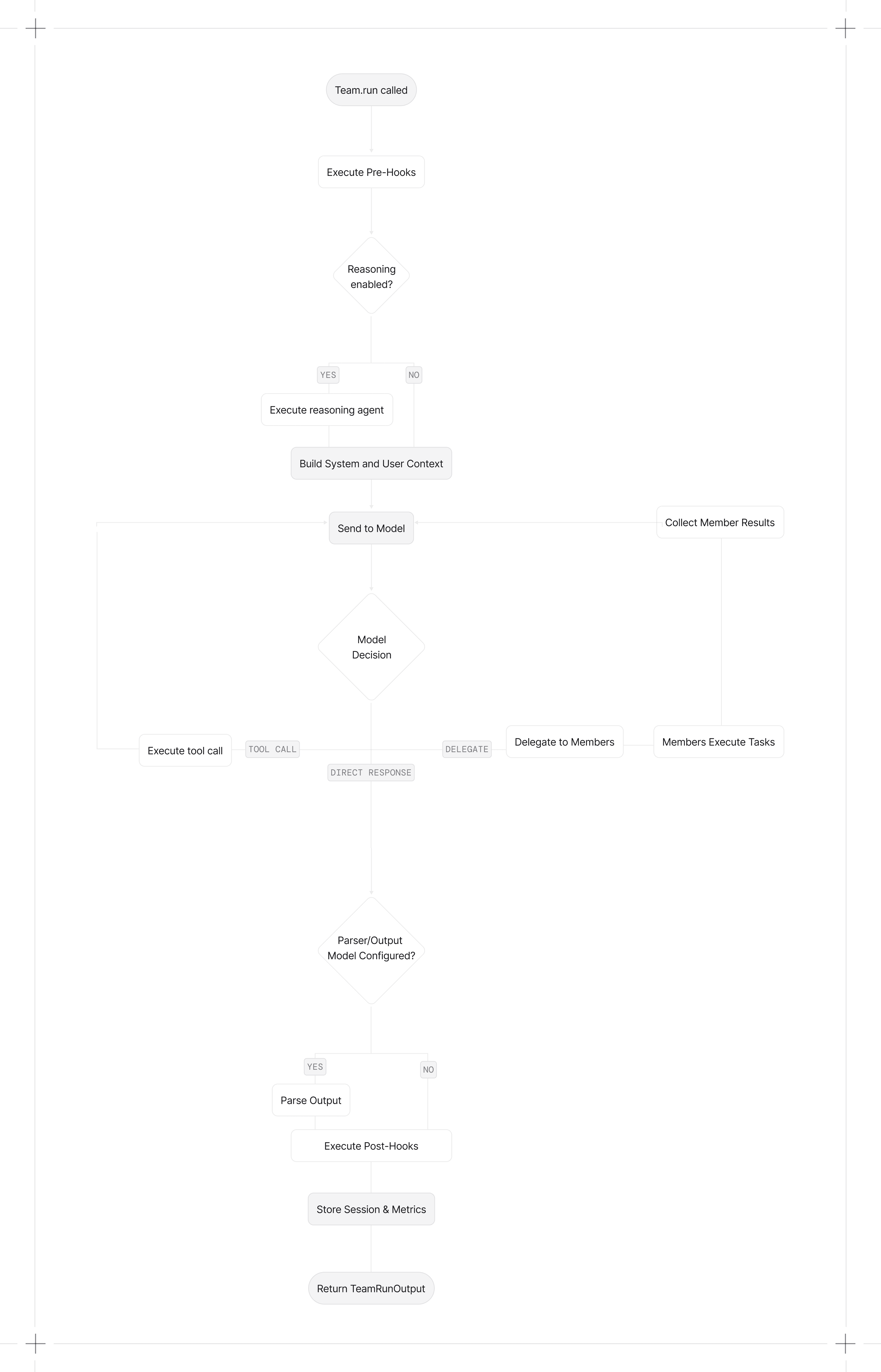
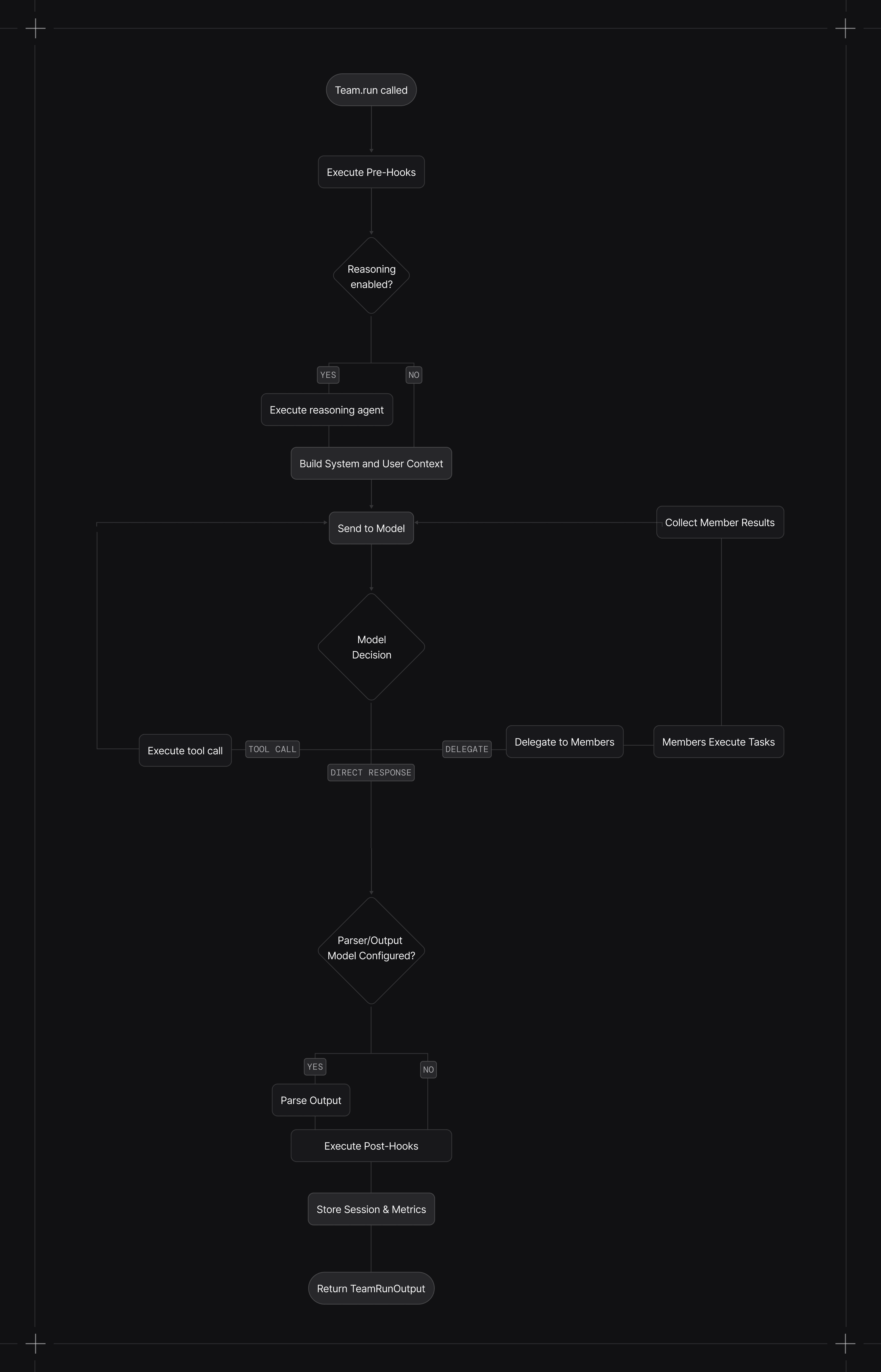
When you call run():
- Pre-hooks execute (if configured)
- Context is built with the configured system message, history, memories, and session state
- Reasoning runs (if enabled) using that context to plan the task
- Model decides whether to respond directly, use tools, or delegate to members
- Delegated members execute their tasks. Multiple async member calls can run concurrently.
- Leader completes the run by returning a routed member response or synthesizing member results, depending on the mode.
- Post-hooks execute (if configured)
- Session and metrics are stored (if database configured)
Callable factories are resolved after session state is loaded, so factories can access run_context and session_state. Async factories require arun() or aprint_response().
| Mode | Execution style |
|---|---|
coordinate | Leader decomposes work, delegates to members, synthesizes results |
route | Leader routes to one member and returns the member response |
broadcast | Leader delegates the same task to all members, then synthesizes |
tasks | Leader runs a task list loop until the goal is complete |
In TeamMode.tasks, the leader uses task management tools to build and execute a shared task list, looping until the goal is complete or max_iterations is reached.
Teams can pause for human-in-the-loop requirements (e.g., approvals or user input). When a run requires confirmation, the run returns with pending requirements so you can collect input or resolve approvals before continuing.
Paused runs return status=RunStatus.paused and requirements on the TeamRunOutput.
Streaming
Enable streaming with stream=True. This returns an iterator of team events and can include delegated member events.
stream = team.run("What are the top AI stories?", stream=True)
for event in stream:
    if event.event == TeamRunEvent.run_content and event.content:
        print(event.content, end="", flush=True)
In TeamMode.tasks, stream_events=True also emits TeamTaskCreated, TeamTaskUpdated, TeamTaskStateUpdated, TeamTaskIterationStarted, and TeamTaskIterationCompleted. See Task Mode Streaming Events.
Stream All Events
Team content is streamed by default. Pause, error, and cancellation events can also be emitted without stream_events=True. Delegated member events are also forwarded because stream_member_events=True by default. Set stream_events=True to include all team-level tool, reasoning, hook, and lifecycle events:
from agno.run.team import TeamRunEvent

stream = team.run(
    "What are the trending AI stories?",
    stream=True,
    stream_events=True
)

for event in stream:
    if event.event == TeamRunEvent.run_content:
        print(event.content, end="", flush=True)
    elif event.event == TeamRunEvent.run_paused:
        print("Run paused")
    elif event.event == TeamRunEvent.run_continued:
        print("Run continued")
    elif event.event == TeamRunEvent.tool_call_started:
        print("Tool call started")
    elif event.event == TeamRunEvent.tool_call_completed:
        print("Tool call completed")
Stream Member Events
Delegated member events are forwarded by default. In async broadcast mode, member runs execute concurrently and their events can interleave.
Set stream_member_events=False to suppress member events:
team = Team(
    name="Research Team",
    members=[news_agent, finance_agent],
    model=OpenAIResponses(id="gpt-5.4-mini"),
    stream_member_events=False
)
Run Output
When stream=False, Team.run() returns a TeamRunOutput object containing:
| Field | Description |
|---|---|
content | The final response content, including a structured model when configured |
messages | Messages used by the team leader's model |
metrics | Token usage, execution time, etc. |
member_responses | Responses from delegated members |
See TeamRunOutput reference for the full schema.
Async Execution
Use arun() for async execution. Members run concurrently when the leader delegates to multiple members at once.
import asyncio

async def main():
    response = await team.arun("Research AI trends and stock performance")
    print(response.content)

asyncio.run(main())
Tasks Mode
Tasks mode runs an iterative loop that creates, executes, and updates tasks until the goal is complete or max_iterations is reached.
from agno.team.mode import TeamMode
from agno.models.openai import OpenAIResponses

team = Team(
    name="Ops Team",
    members=[news_agent, finance_agent],
    model=OpenAIResponses(id="gpt-5.4-mini"),
    mode=TeamMode.tasks,
    max_iterations=6
)

response = team.run("Compile a short report on recent AI agent frameworks.")
print(response.content)
Specifying User and Session
Associate runs with a user and session for history tracking:
team.run(
    "Get my monthly report",
    user_id="john@example.com",
    session_id="session_123"
)
See Sessions for details.
Passing Files
Pass images, audio, video, or files to the team:
from agno.media import Image

team.run(
    "Analyze this image",
    images=[Image(url="https://agno-public.s3.amazonaws.com/images/krakow_mariacki.jpg")]
)
See Multimodal for details.
Structured Output
Pass an output schema to get structured responses:
from pydantic import BaseModel

class Report(BaseModel):
    overview: str
    findings: list[str]

response = team.run("Analyze the market", output_schema=Report)
See Input & Output for details.
Cancelling Runs
Cancel a running team with Team.cancel_run(). See Run Cancellation.
Print Response
For development, use print_response() to display formatted output:
team.print_response("What are the top AI stories?", stream=True)

# Show member responses too
team.print_response("What are the top AI stories?", show_member_responses=True)Core Events
| Event | Description |
|---|---|
TeamRunStarted | Run started |
TeamRunContent | Response text chunk |
TeamRunContentCompleted | Content streaming complete |
TeamRunCompleted | Terminal completion event; cancelled runs also emit it after TeamRunCancelled. Check status and cancellation events before treating it as success. |
TeamRunError | Error occurred |
TeamRunCancelled | Run was cancelled |
Tool Events
| Event | Description |
|---|---|
TeamToolCallStarted | Tool call started |
TeamToolCallCompleted | Tool call completed |
Reasoning Events
| Event | Description |
|---|---|
TeamReasoningStarted | Reasoning started |
TeamReasoningStep | Single reasoning step |
TeamReasoningCompleted | Reasoning completed |
Memory Events
| Event | Description |
|---|---|
TeamMemoryUpdateStarted | Memory update started |
TeamMemoryUpdateCompleted | Memory update completed |
Hook Events
| Event | Description |
|---|---|
TeamPreHookStarted | Pre-hook started |
TeamPreHookCompleted | Pre-hook completed |
TeamPostHookStarted | Post-hook started |
TeamPostHookCompleted | Post-hook completed |
Background Execution
Run teams in the background with arun(background=True). Background execution requires a database so Agno can persist run state. With stream=True, the default in-memory stream backend retains the latest 10,000 events per run in the same AgentOS process. Terminal and paused run buffers become eligible for cleanup after 30 minutes. After a disconnect, an AgentOS client calls the run's /resume endpoint with the last received event index; replay depends on those events still being retained.
See Background Execution for polling, resumable streaming, and the /resume endpoint.