This guide walks you through setting up tracing for your Agno agents. Tracing is designed to be simple: install dependencies, enable tracing, and all your agents are automatically instrumented.
setup_tracing() - Use this function for standalone scripts, notebooks, and custom applications. Provides full control over configuration options like batch processing, queue sizes, and export delays.
AgentOS tracing=True - Use this parameter when deploying agents through AgentOS. Simpler setup for production deployments with sensible defaults.
For standalone scripts, notebooks, or custom applications use setup_tracing():
Copy
Ask AI
from agno.agent import Agentfrom agno.db.sqlite import SqliteDbfrom agno.models.openai import OpenAIChatfrom agno.tracing import setup_tracing# Set up your tracing databasetracing_db = SqliteDb(db_file="tmp/traces.db")# Enable tracing (call this ONCE at startup)setup_tracing(db=tracing_db)# Create and run agents - they're automatically traced!agent = Agent( name="Research Agent", model=OpenAIChat(id="gpt-4o-mini"), instructions="You are a research assistant",)response = agent.run("What is quantum computing?")
Call setup_tracing()before creating your agents. This ensures the instrumentation is active when agents are initialized.
You can also use setup_tracing() to configure tracing for AgentOS but make sure to pass the tracing_db to AgentOS so traces are accessible through the AgentOS API and UI.
Copy
Ask AI
from agno.os import AgentOSfrom agno.tracing import setup_tracingtracing_db = SqliteDb(db_file="tmp/traces.db")setup_tracing(db=tracing_db)agent_os = AgentOS( agents=[my_agent], tracing_db=tracing_db, # <-- Pass the tracing_db to AgentOS so traces are accessible through the AgentOS API and UI.)
tracing_db is required in AgentOS to ensure traces are accessible through the AgentOS API and UI.
For detailed AgentOS tracing configuration including multi-database setups, see Tracing in AgentOS.
Recommended: Use a separate database for storing traces, especially when you have multiple agents or teams with their own databases.
When agents and teams each have their own databases for sessions and memory, traces should go to a dedicated central database. This ensures:
Unified observability: All traces in one place for cross-agent analysis
Simpler querying: No need to search multiple databases
Independent scaling: Traces can grow independently from agent data
Cleaner separation: Agent data and observability data don’t mix
Example: Multiple Agents with Shared Tracing
Copy
Ask AI
from agno.agent import Agentfrom agno.db.sqlite import SqliteDbfrom agno.models.openai import OpenAIChatfrom agno.tracing import setup_tracingfrom agno.tools.duckduckgo import DuckDuckGoToolsfrom agno.tools.hackernews import HackerNewsTools# Each agent has its own database for sessions/memoryagent1_db = SqliteDb(db_file="tmp/agent1.db", id="agent1_db")agent2_db = SqliteDb(db_file="tmp/agent2.db", id="agent2_db")# Dedicated database for ALL traces (separate from agent databases)tracing_db = SqliteDb(db_file="tmp/traces.db", id="traces_db")# Enable tracing to the dedicated databasesetup_tracing( db=tracing_db, batch_processing=True, max_queue_size=1024, max_export_batch_size=256,)# Agent 1: HackerNews specialist with its own databasehackernews_agent = Agent( name="HackerNews Agent", model=OpenAIChat(id="gpt-4o-mini"), tools=[HackerNewsTools()], instructions="You are a hacker news agent. Answer questions concisely.", markdown=True, db=agent1_db, # Agent's own database)# Agent 2: Web search specialist with its own databasesearch_agent = Agent( name="Web Search Agent", model=OpenAIChat(id="gpt-4o-mini"), tools=[DuckDuckGoTools()], instructions="You are a web search agent. Answer questions concisely.", markdown=True, db=agent2_db, # Agent's own database)# Both agents are traced to the same tracing_dbhackernews_agent.run("What's trending on HackerNews?")search_agent.run("Latest AI news")# Query traces for both agents from one placetraces, count = tracing_db.get_traces(limit=20)print(f"Found {count} traces across all agents")
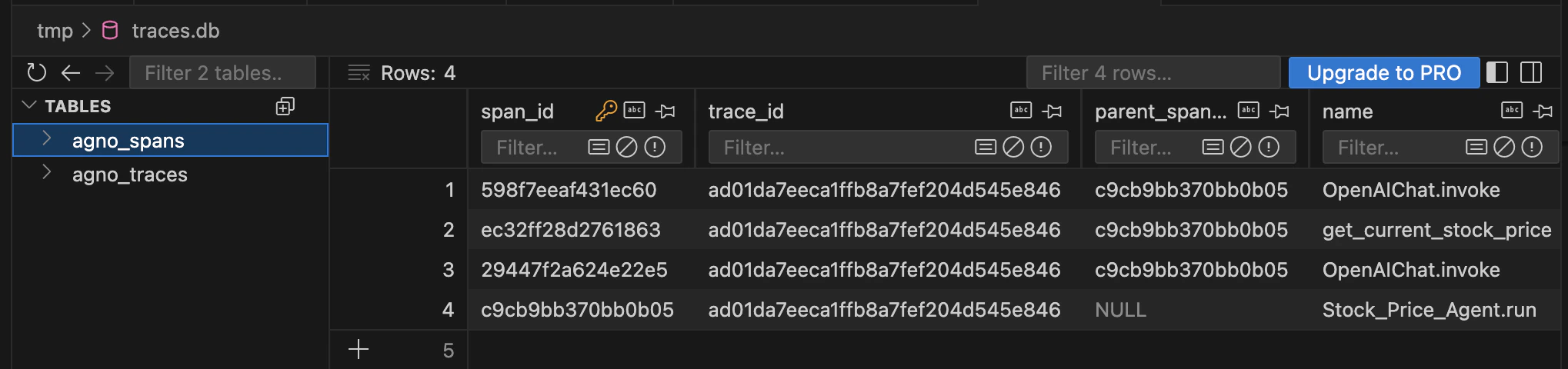
Once configured, traces and spans are automatically stored in your database. The tracing system creates two tables: agno_traces for high-level trace information and agno_spans for individual span details.
Traces stored in SQLite database viewed with TablePlus
Each span record includes the trace_id to group related operations, parent_span_id for hierarchy, and the operation name (e.g., Stock_Price_Agent.run, OpenAIChat.invoke, get_current_stock_price).