User Management
Maintain an AgentOS user directory, provision profiles, disable accounts, and manage users through the admin API.
Pass a UserDirectory as AgentOS(user_directory=...) to maintain profiles for your application's end users and an account-disable flag in your own database. Your application or identity provider authenticates users and issues the JWTs; directory IDs match each token's sub claim. Role policy lives separately in AgentOS Roles, and user-owned data is scoped through user isolation.
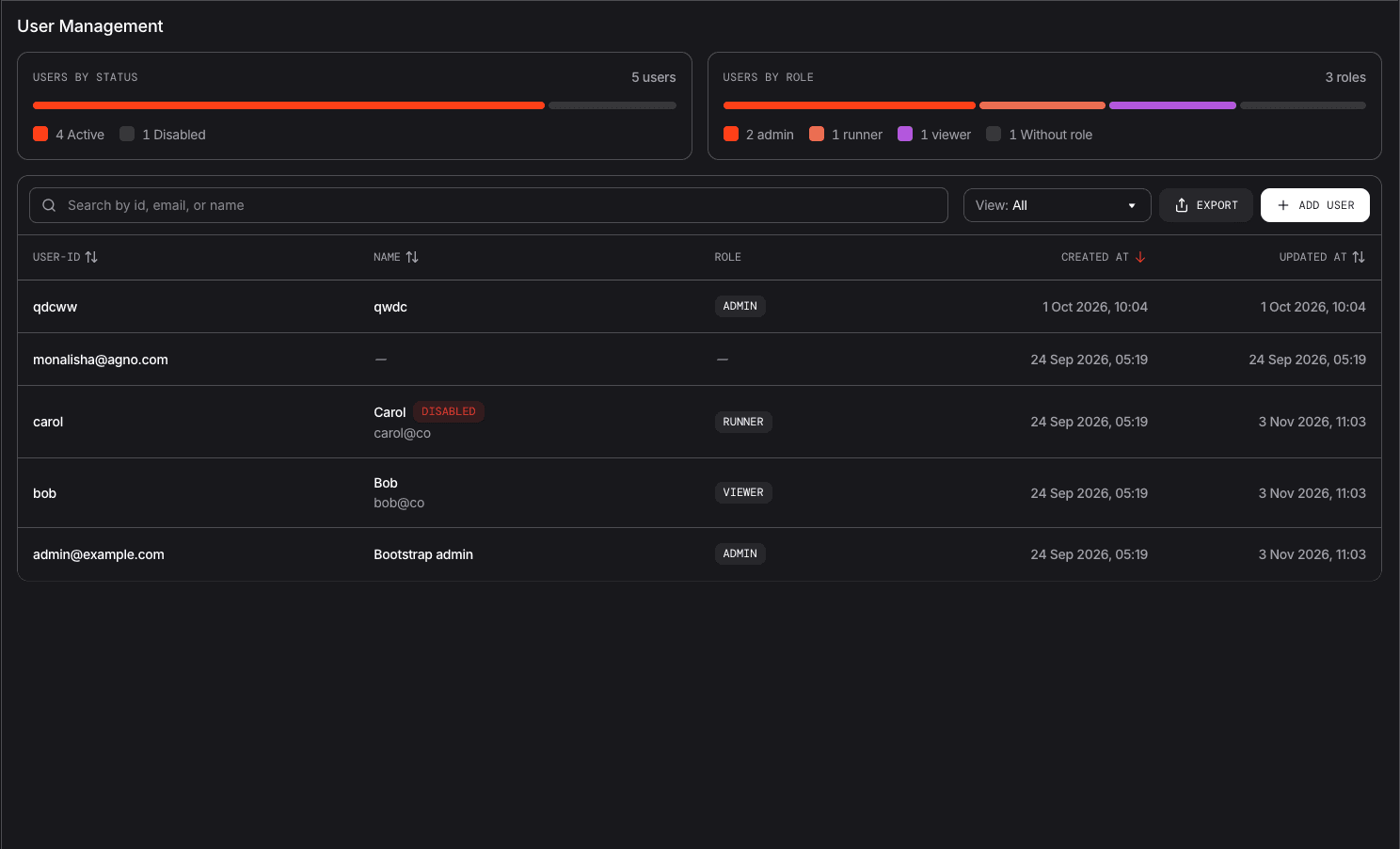
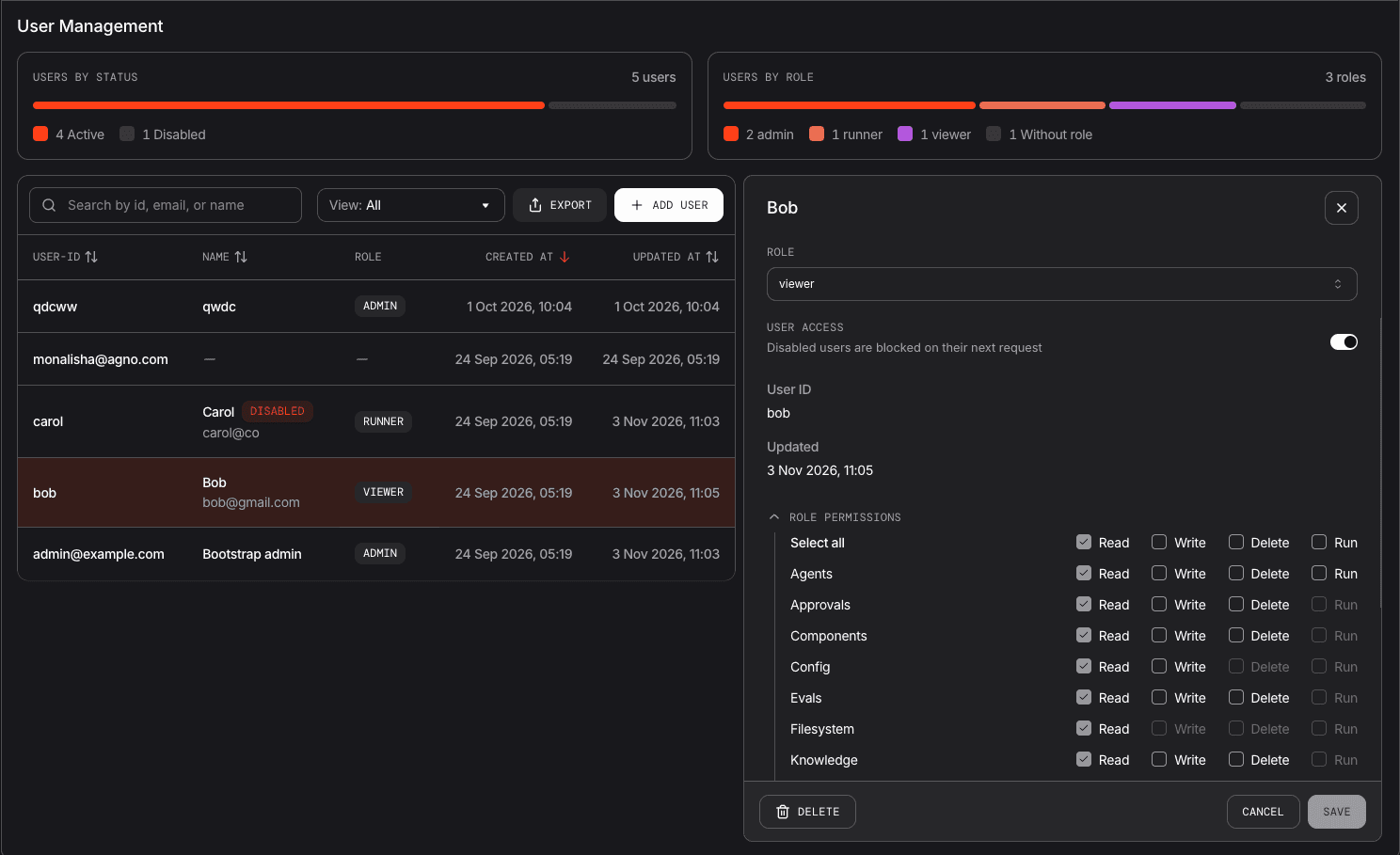
Manage the directory in code, through the /users admin API, or from os.agno.com → Manage OS → User Management. Members of your Agno organization are managed in os.agno.com → Settings instead.
The user-directory APIs are part of open-source AgentOS. Hosted control-plane end-user management has separate plan requirements.
Configure a User Directory
Install the runtime, model client, PostgreSQL driver, and asymmetric JWT support:
uv pip install -U "agno[os]>=3.1.3" openai "psycopg[binary]" "PyJWT[crypto]"Start PostgreSQL using the PostgreSQL setup. Set DATABASE_URL to your connection string, JWT_VERIFICATION_KEY to your issuer's RS256 public key, AGNO_ADMIN_SUBJECT to the admin's JWT sub, and OPENAI_API_KEY. Configure the issuer to send aud="managed-users-os" and a usable sub.
import os

from agno.agent import Agent
from agno.db.postgres import PostgresDb
from agno.models.openai import OpenAIResponses
from agno.os import AgentOS, Authorization, UserDirectory

db = PostgresDb(db_url=os.environ["DATABASE_URL"])
admin_subject = os.environ["AGNO_ADMIN_SUBJECT"]

users = UserDirectory(db=db, auto_provision=False)
users.upsert(admin_subject, name="Runtime administrator")
users.upsert("user-123", email="user@example.com", name="Example User")

authz = Authorization(
    verification_keys=[os.environ["JWT_VERIFICATION_KEY"]],
    algorithm="RS256",
    verify_audience=True,
    audience="managed-users-os",
    audit=True,
)
authz.define_role("admin", ["agent_os:admin"])
authz.define_role("viewer", ["agents:read"])
authz.seed(admin=admin_subject)
authz.assign("user-123", "viewer")

agent = Agent(
    id="research-agent",
    model=OpenAIResponses(id="gpt-5.6-luna"),
)
agent_os = AgentOS(
    id="managed-users-os",
    agents=[agent],
    db=db,
    user_directory=users,
    authorization=authz,
    user_isolation=True,
)
app = agent_os.get_app()

if __name__ == "__main__":
    agent_os.serve(app="managed_users_app:app", port=7777)
Run python managed_users_app.py. The directory exposes /users, and the managed-role setup exposes /authz; both require admin access (see Admin API). The viewer role permits agent reads; running agents or reading other resource families requires additional grants.
UserDirectory stores id, optional email and name, disabled, timestamps, and free-form metadata. Your login service continues to own passwords and credentials. users.upsert(...) updates the supplied profile fields while preserving the account's disabled state.
You can also use AgentOS(db=db, user_directory=True, authorization=authz) to create a directory on the OS database with automatic provisioning enabled. A directory constructed without db or db_url adopts the OS database when wired into AgentOS. Serving a directory requires SQL-backed persistence so all replicas observe the same disabled state.
Provision Users from JWT Claims
Set auto_provision=True to create an unknown subject's profile on its first authenticated request. Configure claim names when your issuer uses different profile fields:
users = UserDirectory(
    db=db,
    auto_provision=True,
    email_claim="email",
    name_claim="display_name",
    fail_closed=True,
)
Pass this instance to AgentOS(user_directory=users, ...). Provisioning copies profile claims when creating a row; it leaves existing profiles and disabled flags unchanged. With managed roles, mark a role using authz.define_role("viewer", ["agents:read"], default=True) to grant it to newly provisioned users that have no stored role. In the stored-assignment path, a new user with no existing role or default role is denied until a role is assigned. With no role store, permissions continue to come from the configured scope provider or custom policy.
auto_provision=False controls directory creation only. An unknown subject is not treated as disabled, so the directory is not an allowlist. If only registered users may access your application, enforce that requirement in your issuer or authorization policy.
Manage Profiles and Roles
Manage profiles through the directory:
users.upsert("user-123", name="Updated Name", metadata={"department": "support"})
user = users.get("user-123")
page = users.list(limit=20, offset=0, search="example.com", sort_by="name", order="asc")
total = users.count(search="example.com")
For async callers, use the corresponding methods:
await users.aupsert("user-123", name="Updated Name")
user = await users.aget("user-123")
page = await users.alist(limit=20, offset=0)
Change roles with authz.set_role, as described in AgentOS Roles. When your identity provider supplies the configured role claim, those token roles take precedence over stored assignments for authorization.
Disable and Re-enable Accounts
Disable an account through the directory:
users.set_disabled("user-123", True, actor=admin_subject)
users.set_disabled("user-123", False, actor=admin_subject)
Async callers use await users.aset_disabled(...). With authenticated identity, a disabled user receives 403 on subsequent protected requests even if their JWT remains valid. Disabling an unknown subject writes a persistent disabled record, so later automatic provisioning cannot activate it.
fail_closed=True is the default: a failed directory read during the disabled-account check returns 503. Setting it to False allows requests to continue when that check fails. With Authorization(audit=True), directory changes share the role-change audit sink, including the actor supplied to SDK operations or resolved from an admin API request.
users.remove(id) deletes the profile but leaves stored role assignments intact. DELETE /users/{id} also revokes stored roles when a managed-role store is wired in. With automatic provisioning enabled, a later valid JWT can recreate the profile and receive a default role; token roles or scope grants can still authorize that caller. Use the disabled flag to revoke access while keeping the record.
The directory manages human subjects. Service-account PATs and other reserved system identities skip it; revoke a service-account token through the service-account API instead.
Admin API
When authentication is configured, /users requires admin access. Managed-role deployments accept a role granting agent_os:admin; scope-based deployments accept the configured admin scope. A security key authenticates as the runtime's unscoped administrator. With no authentication configured, the directory API is open and the disabled flag is advisory. Enable authorization for enforced user management.
| Endpoint | Behavior |
|---|---|
GET /users | List profiles with pagination, search, sorting, and optional exclusion of disabled users. |
POST /users | Create or update a profile using id, email, and name. |
GET /users/{id} | Read one profile; returns 404 when absent. |
PATCH /users/{id} | Update email, name, or disabled. Can create an unknown subject's profile. |
DELETE /users/{id} | Remove the profile and revoke stored role assignments when a managed-role store is present. |
GET /users/metrics | Read directory totals, registration counts by UTC day, and stored role distribution when configured. |
GET /users defaults to page=1, limit=20 with a maximum of 100, include_disabled=true, sort_by=created_at, and sort_order=desc. Search matches id, email, and name case-insensitively. Supported sort fields are created_at, updated_at, id, email, and name. The response uses {data, meta} pagination; profiles include status, disabled, and stored role_slug and role_name when available.
Use IDs distinct from managed-role slugs and reserved system principals. The management API rejects creating a profile for either with 422.
For example, using an issuer-signed admin token for this runtime:
curl -H "Authorization: Bearer $ADMIN_TOKEN" \
  "http://localhost:7777/users?page=1&limit=20&include_disabled=false"

curl -X PATCH -H "Authorization: Bearer $ADMIN_TOKEN" \
  -H "Content-Type: application/json" \
  --data '{"disabled": true}' \
  http://localhost:7777/users/user-123
Assign roles separately through the managed-role API, such as POST /authz/subjects/{subject}/roles with {"role": "viewer"}. The profile's displayed role reflects stored assignments; it is not a readout of the roles in a caller's current JWT.
Metrics contain total, active, disabled, and created_per_day. With a role store, they also contain by_role and without_role; those fields are null otherwise. starting_date and ending_date filter the daily series by UTC date, inclusive, without filtering totals or role counts. The series reflects rows still in the directory, so deleted users drop out of it.