> ## Documentation Index
> Fetch the complete documentation index at: https://docs.agno.com/llms.txt
> Use this file to discover all available pages before exploring further.
# What are Workflows?
> Workflows orchestrate agents, teams, and functions through defined steps for repeatable tasks.
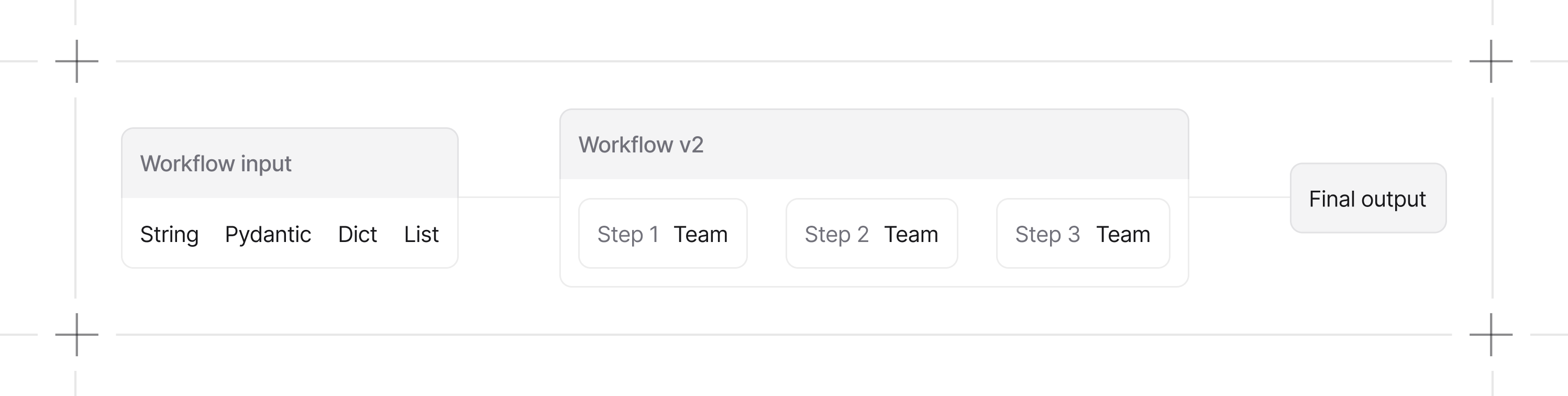
A Workflow orchestrates agents, teams, and functions as a collection of steps. Steps can run sequentially, in parallel, in loops, or conditionally based on results. Output from each step flows to the next, creating a predictable pipeline for complex tasks.
 ## Your First Workflow
Here's a simple workflow that takes a topic, researches it, and writes an article:
```python theme={null}
from agno.agent import Agent
from agno.workflow import Workflow
from agno.tools.hackernews import HackerNewsTools
researcher = Agent(
name="Researcher",
instructions="Find relevant information about the topic",
tools=[HackerNewsTools()]
)
writer = Agent(
name="Writer",
instructions="Write a clear, engaging article based on the research"
)
content_workflow = Workflow(
name="Content Creation",
steps=[researcher, writer]
)
content_workflow.print_response("Write an article about AI trends", stream=True)
```
## When to Use Workflows
Use a workflow when:
* You need predictable, repeatable execution
* Tasks have clear sequential steps with defined inputs and outputs
* You want audit trails and consistent results across runs
Use a [Team](/teams/overview) when you need flexible, collaborative problem-solving where agents coordinate dynamically.
## What Can Be a Step?
| Step Type | Description |
| ------------ | ----------------------------------------------------------- |
| **Agent** | Individual AI executor with specific tools and instructions |
| **Team** | Coordinated group of agents for complex sub-tasks |
| **Function** | Custom Python function for specialized logic |
| **Workflow** | Nested workflow for composable, reusable sub-pipelines |
## Controlling Workflows
Workflows support conditional logic, parallel execution, loops, and conversational interactions. See the guides below for details.
## Guides
Define steps, inputs, and outputs.
Execute workflows and handle responses.
Enable chat interactions on your workflows.
## Developer Resources
* [Workflow examples](/cookbook/workflows/overview)
* [Workflow reference](/reference/workflows/workflow)
## Your First Workflow
Here's a simple workflow that takes a topic, researches it, and writes an article:
```python theme={null}
from agno.agent import Agent
from agno.workflow import Workflow
from agno.tools.hackernews import HackerNewsTools
researcher = Agent(
name="Researcher",
instructions="Find relevant information about the topic",
tools=[HackerNewsTools()]
)
writer = Agent(
name="Writer",
instructions="Write a clear, engaging article based on the research"
)
content_workflow = Workflow(
name="Content Creation",
steps=[researcher, writer]
)
content_workflow.print_response("Write an article about AI trends", stream=True)
```
## When to Use Workflows
Use a workflow when:
* You need predictable, repeatable execution
* Tasks have clear sequential steps with defined inputs and outputs
* You want audit trails and consistent results across runs
Use a [Team](/teams/overview) when you need flexible, collaborative problem-solving where agents coordinate dynamically.
## What Can Be a Step?
| Step Type | Description |
| ------------ | ----------------------------------------------------------- |
| **Agent** | Individual AI executor with specific tools and instructions |
| **Team** | Coordinated group of agents for complex sub-tasks |
| **Function** | Custom Python function for specialized logic |
| **Workflow** | Nested workflow for composable, reusable sub-pipelines |
## Controlling Workflows
Workflows support conditional logic, parallel execution, loops, and conversational interactions. See the guides below for details.
## Guides
Define steps, inputs, and outputs.
Execute workflows and handle responses.
Enable chat interactions on your workflows.
## Developer Resources
* [Workflow examples](/cookbook/workflows/overview)
* [Workflow reference](/reference/workflows/workflow)