> ## Documentation Index
> Fetch the complete documentation index at: https://docs.agno.com/llms.txt
> Use this file to discover all available pages before exploring further.
# Tracing
> Trace agent, team, and workflow runs with OpenTelemetry and store spans in a configured database or observability backend.
v2.3.5
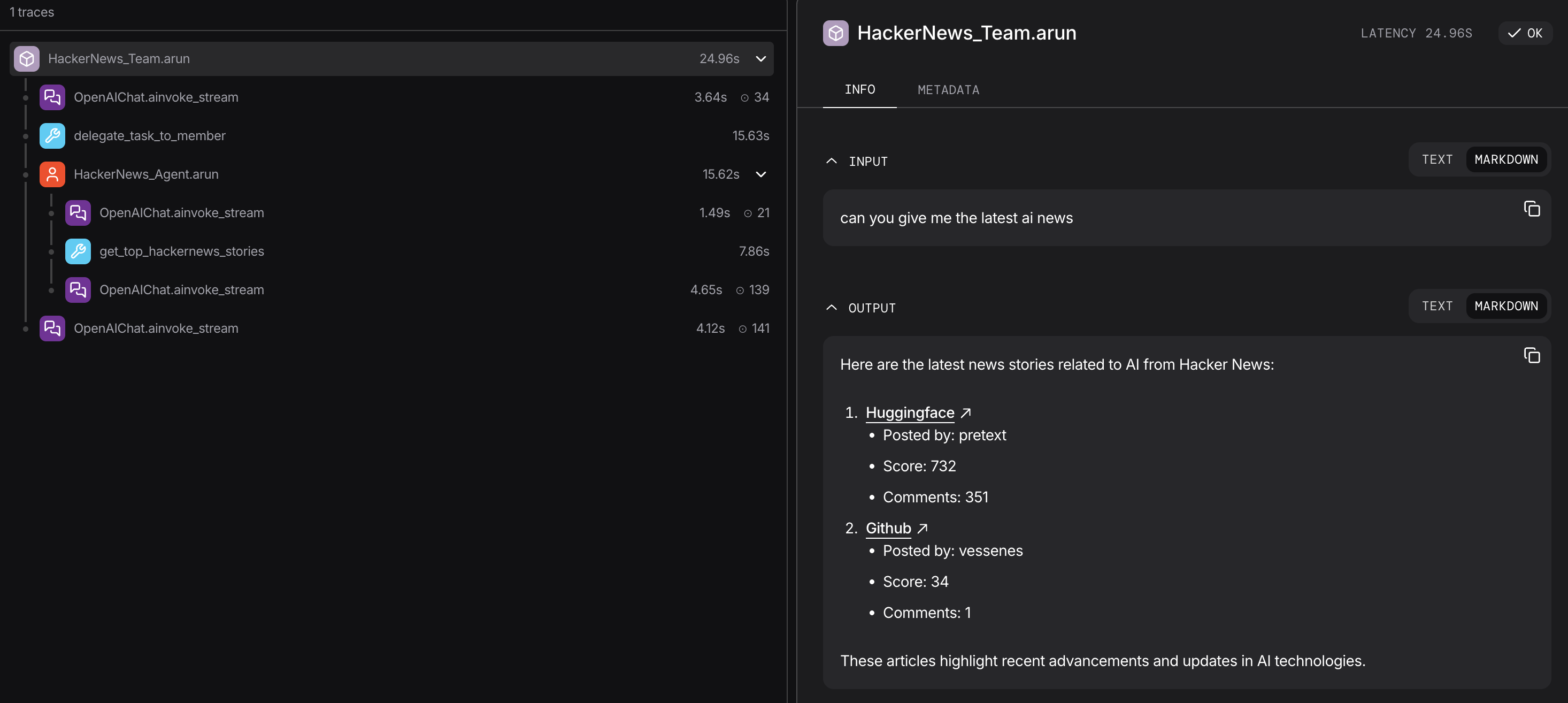
A final run response shows the outcome. Tracing shows the model calls, tool executions, and nested agent, team, or workflow operations that produced it. Developers use traces to investigate failures, latency, token usage, and unexpected tool behavior.
## Trace an Agent
```bash theme={null}
uv pip install -U "agno[os]" openai opentelemetry-api opentelemetry-sdk openinference-instrumentation-agno
```
Call `setup_tracing()` once at application startup, before creating agents.
```python tracing_agent.py theme={null}
from agno.agent import Agent
from agno.db.sqlite import SqliteDb
from agno.models.openai import OpenAIResponses
from agno.tracing import setup_tracing
traces_db = SqliteDb(db_file="tmp/traces.db")
setup_tracing(db=traces_db)
agent = Agent(
id="support-agent",
model=OpenAIResponses(id="gpt-5.4-mini"),
instructions="Answer support questions concisely.",
)
agent.run("Summarize the latest support request.")
```
```python theme={null}
traces, total = traces_db.get_traces(agent_id="support-agent", limit=10)
for trace in traces:
print(trace.name, trace.duration_ms)
```
`setup_tracing(db=...)` installs Agno's `DatabaseSpanExporter` and instruments agents, teams, and workflows through OpenTelemetry.
 ## Traces and Spans
| Concept | Description |
| ------------------------- | --------------------------------------------------------------------------------------------- |
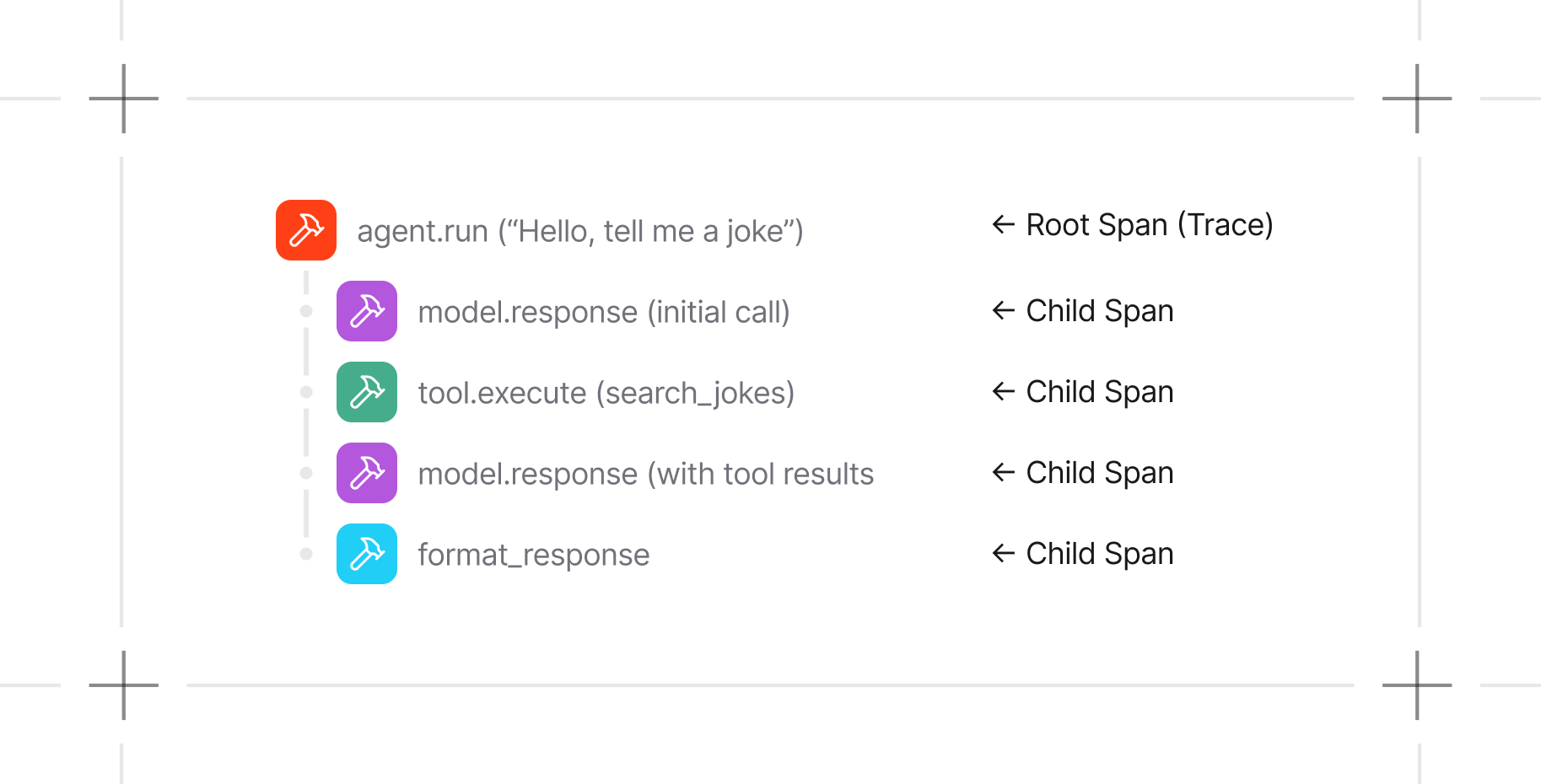
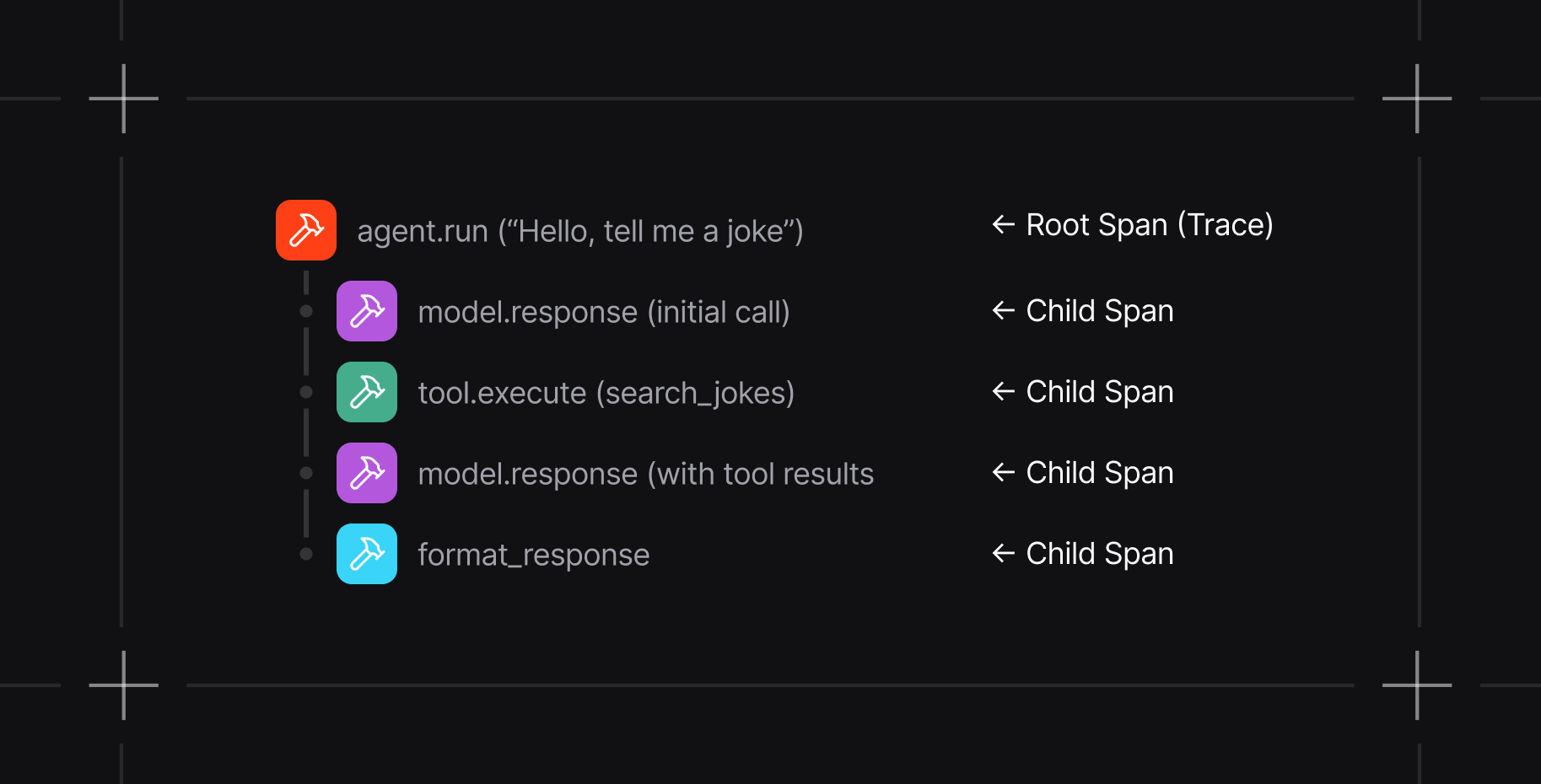
| Trace | One complete execution, identified by `trace_id` |
| Span | One timed operation within the trace, such as an agent run, model response, or tool execution |
| Parent-child relationship | Connects nested operations into the execution hierarchy |
## Traces and Spans
| Concept | Description |
| ------------------------- | --------------------------------------------------------------------------------------------- |
| Trace | One complete execution, identified by `trace_id` |
| Span | One timed operation within the trace, such as an agent run, model response, or tool execution |
| Parent-child relationship | Connects nested operations into the execution hierarchy |
 ## What Gets Traced
Agno instrumentation captures spans for:
| Operation | Examples |
| ------------------ | ----------------------------------- |
| Agent runs | `agent.run()` and `agent.arun()` |
| Model calls | Model requests and responses |
| Tool execution | Tool calls and results |
| Team execution | Leader coordination and member runs |
| Workflow execution | Workflow runs and step execution |
Spans carry timing, status, relationships, and operation attributes. Trace payloads can include application inputs and outputs. Review captured attributes before sending traces to a shared or external destination.
## Choose a Trace Destination
Tracing storage follows the OpenTelemetry configuration in your application:
| Configuration | Destination |
| -------------------------------------------------------------------- | ----------------------------------------------------------------- |
| `setup_tracing(db=...)` | The selected Agno database through `DatabaseSpanExporter` |
| `AgentOS(..., tracing=True, db=...)` | The AgentOS database, available through its API and Control Plane |
| A custom OpenTelemetry provider instrumented with `AgnoInstrumentor` | The backend configured by that provider's exporter |
Use [Agno OpenTelemetry integrations](/observability/overview) when traces should go to an external observability backend. The exporter configuration determines where those spans are sent.
## Immediate and Batch Export
`setup_tracing()` writes each completed span immediately by default. Set `batch_processing=True` to queue spans and export them in batches.
```python theme={null}
setup_tracing(
db=traces_db,
batch_processing=True,
max_queue_size=2048,
max_export_batch_size=512,
schedule_delay_millis=5000,
)
```
| Parameter | Default | Purpose |
| ----------------------- | ------- | ---------------------------------------------- |
| `batch_processing` | `False` | Use batched export instead of immediate export |
| `max_queue_size` | `2048` | Maximum queued spans |
| `max_export_batch_size` | `512` | Maximum spans in one export batch |
| `schedule_delay_millis` | `5000` | Delay between scheduled batch exports |
## Next Steps
Configure SDK and AgentOS tracing.
Store and inspect traces for an AgentOS runtime.
Query traces and spans from an Agno database.
## What Gets Traced
Agno instrumentation captures spans for:
| Operation | Examples |
| ------------------ | ----------------------------------- |
| Agent runs | `agent.run()` and `agent.arun()` |
| Model calls | Model requests and responses |
| Tool execution | Tool calls and results |
| Team execution | Leader coordination and member runs |
| Workflow execution | Workflow runs and step execution |
Spans carry timing, status, relationships, and operation attributes. Trace payloads can include application inputs and outputs. Review captured attributes before sending traces to a shared or external destination.
## Choose a Trace Destination
Tracing storage follows the OpenTelemetry configuration in your application:
| Configuration | Destination |
| -------------------------------------------------------------------- | ----------------------------------------------------------------- |
| `setup_tracing(db=...)` | The selected Agno database through `DatabaseSpanExporter` |
| `AgentOS(..., tracing=True, db=...)` | The AgentOS database, available through its API and Control Plane |
| A custom OpenTelemetry provider instrumented with `AgnoInstrumentor` | The backend configured by that provider's exporter |
Use [Agno OpenTelemetry integrations](/observability/overview) when traces should go to an external observability backend. The exporter configuration determines where those spans are sent.
## Immediate and Batch Export
`setup_tracing()` writes each completed span immediately by default. Set `batch_processing=True` to queue spans and export them in batches.
```python theme={null}
setup_tracing(
db=traces_db,
batch_processing=True,
max_queue_size=2048,
max_export_batch_size=512,
schedule_delay_millis=5000,
)
```
| Parameter | Default | Purpose |
| ----------------------- | ------- | ---------------------------------------------- |
| `batch_processing` | `False` | Use batched export instead of immediate export |
| `max_queue_size` | `2048` | Maximum queued spans |
| `max_export_batch_size` | `512` | Maximum spans in one export batch |
| `schedule_delay_millis` | `5000` | Delay between scheduled batch exports |
## Next Steps
Configure SDK and AgentOS tracing.
Store and inspect traces for an AgentOS runtime.
Query traces and spans from an Agno database.