> ## Documentation Index
> Fetch the complete documentation index at: https://docs.agno.com/llms.txt
> Use this file to discover all available pages before exploring further.
# Running Teams
> Execute teams with Team.run() and process their output.
Run your team with `Team.run()` (sync) or `Team.arun()` (async).
## Basic Execution
```python theme={null}
from agno.team import Team
from agno.agent import Agent
from agno.models.openai import OpenAIResponses
from agno.run.team import TeamRunEvent
from agno.tools.hackernews import HackerNewsTools
from agno.tools.yfinance import YFinanceTools
news_agent = Agent(name="News Agent", role="Get tech news", tools=[HackerNewsTools()])
finance_agent = Agent(name="Finance Agent", role="Get stock data", tools=[YFinanceTools()])
team = Team(
name="Research Team",
members=[news_agent, finance_agent],
model=OpenAIResponses(id="gpt-5.4-mini")
)
# Run and get response
response = team.run("What are the trending AI stories?")
print(response.content)
# Run with streaming
stream = team.run("What are the trending AI stories?", stream=True)
for event in stream:
if event.event == TeamRunEvent.run_content and event.content:
print(event.content, end="", flush=True)
```
## Run the example
```bash theme={null}
uv pip install -U agno openai yfinance
```
```bash macOS / Linux theme={null}
export OPENAI_API_KEY="your_openai_api_key_here"
```
```powershell Windows theme={null}
$Env:OPENAI_API_KEY="your_openai_api_key_here"
```
Save the code as `running_team.py`, then run:
```bash theme={null}
python running_team.py
```
## Execution Flow
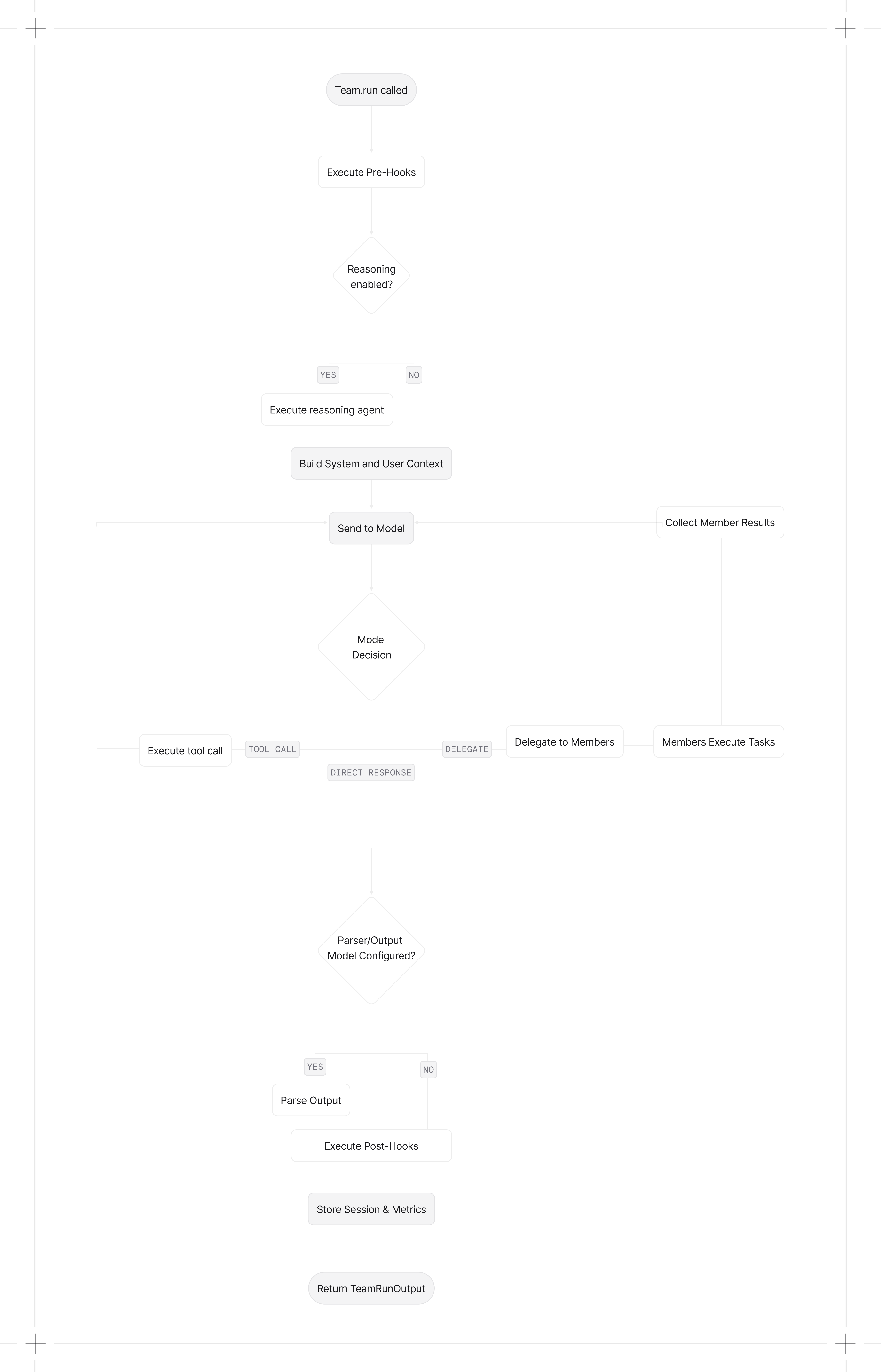
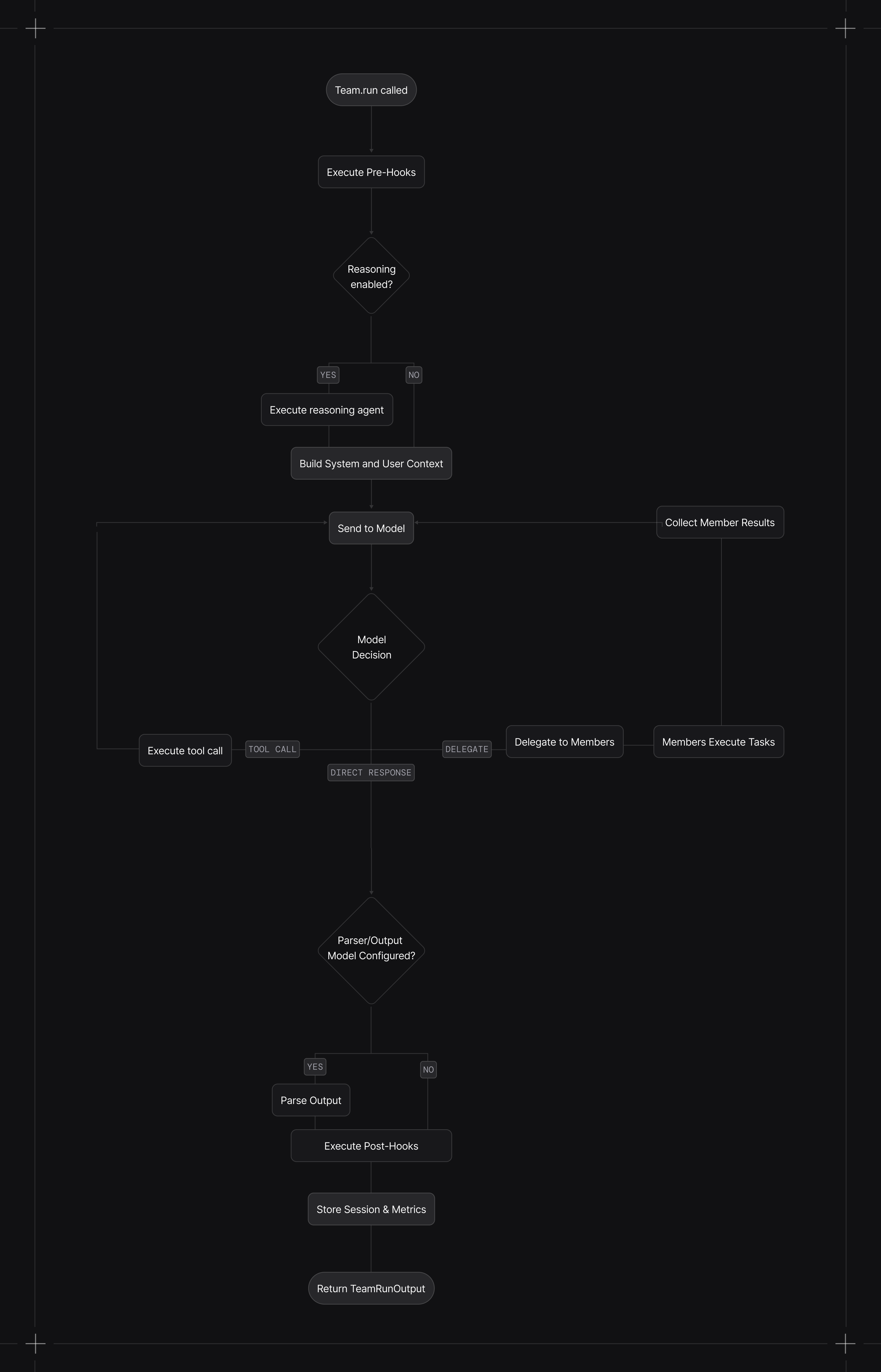
When you call `run()`:
1. **Pre-hooks execute** (if configured)
2. **Reasoning runs** (if enabled) to plan the task
3. **Context is built** with system message, history, memories, and session state
4. **Model decides** whether to respond directly, use tools, or delegate to members
5. **Delegated members execute** their tasks. Multiple async member calls can run concurrently.
6. **Leader completes the run** by returning a routed member response or synthesizing member results, depending on the mode.
7. **Post-hooks execute** (if configured)
8. **Session and metrics are stored** (if database configured)
[Callable factories](/teams/overview#callable-factories) are resolved after session state is loaded, so factories can access `run_context` and `session_state`. Async factories require `arun()` or `aprint_response()`.
In `TeamMode.tasks`, the leader uses task management tools to build and execute a shared task list, looping until the goal is complete or `max_iterations` is reached.
Teams can pause for human-in-the-loop requirements (e.g., approvals or user input). When a run requires confirmation, the run returns with pending requirements so you can collect input or resolve approvals before continuing.
Paused runs return `status=RunStatus.paused` and `requirements` on the `TeamRunOutput`.
 ## Streaming
Enable streaming with `stream=True`. This returns an iterator of team events and can include delegated member events.
```python theme={null}
stream = team.run("What are the top AI stories?", stream=True)
for event in stream:
if event.event == TeamRunEvent.run_content and event.content:
print(event.content, end="", flush=True)
```
In `TeamMode.tasks`, `stream_events=True` also emits `TeamTaskCreated`, `TeamTaskUpdated`, `TeamTaskStateUpdated`, `TeamTaskIterationStarted`, and `TeamTaskIterationCompleted`. See [Task Mode Streaming Events](/examples/teams/modes/tasks/streaming-events).
### Stream All Events
Team content is streamed by default. Delegated member events are also forwarded because `stream_member_events=True` by default. Set `stream_events=True` to include all team-level tool, reasoning, hook, and lifecycle events:
```python theme={null}
from agno.run.team import TeamRunEvent
stream = team.run(
"What are the trending AI stories?",
stream=True,
stream_events=True
)
for event in stream:
if event.event == TeamRunEvent.run_content:
print(event.content, end="", flush=True)
elif event.event == TeamRunEvent.run_paused:
print("Run paused")
elif event.event == TeamRunEvent.run_continued:
print("Run continued")
elif event.event == TeamRunEvent.tool_call_started:
print("Tool call started")
elif event.event == TeamRunEvent.tool_call_completed:
print("Tool call completed")
```
### Stream Member Events
Delegated member events are forwarded by default. In async broadcast mode, member runs execute concurrently and their events can interleave.
Set `stream_member_events=False` to suppress member events:
```python theme={null}
team = Team(
name="Research Team",
members=[news_agent, finance_agent],
model=OpenAIResponses(id="gpt-5.4-mini"),
stream_member_events=False
)
```
## Run Output
`Team.run()` returns a `TeamRunOutput` object containing:
| Field | Description |
| ------------------ | ------------------------------------------------------------------------ |
| `content` | The final response content, including a structured model when configured |
| `messages` | Messages used by the team leader's model |
| `metrics` | Token usage, execution time, etc. |
| `member_responses` | Responses from delegated members |
See [TeamRunOutput reference](/reference/teams/team-response) for the full schema.
## Async Execution
Use `arun()` for async execution. Members run concurrently when the leader delegates to multiple members at once.
```python theme={null}
import asyncio
async def main():
response = await team.arun("Research AI trends and stock performance")
print(response.content)
asyncio.run(main())
```
## Tasks Mode
Tasks mode runs an iterative loop that creates, executes, and updates tasks until the goal is complete or `max_iterations` is reached.
```python theme={null}
from agno.team.mode import TeamMode
from agno.models.openai import OpenAIResponses
team = Team(
name="Ops Team",
members=[news_agent, finance_agent],
model=OpenAIResponses(id="gpt-5.4-mini"),
mode=TeamMode.tasks,
max_iterations=6
)
response = team.run("Compile a short report on recent AI agent frameworks.")
print(response.content)
```
## Specifying User and Session
Associate runs with a user and session for history tracking:
```python theme={null}
team.run(
"Get my monthly report",
user_id="john@example.com",
session_id="session_123"
)
```
See [Sessions](/sessions/overview) for details.
## Passing Files
Pass images, audio, video, or files to the team:
```python theme={null}
from agno.media import Image
team.run(
"Analyze this image",
images=[Image(url="https://agno-public.s3.amazonaws.com/images/krakow_mariacki.jpg")]
)
```
See [Multimodal](/multimodal/overview) for details.
## Structured Output
Pass an output schema to get structured responses:
```python theme={null}
from pydantic import BaseModel
class Report(BaseModel):
overview: str
findings: list[str]
response = team.run("Analyze the market", output_schema=Report)
```
See [Input & Output](/input-output/overview) for details.
## Cancelling Runs
Cancel a running team with `Team.cancel_run()`. See [Run Cancellation](/run-cancellation/overview).
## Print Response
For development, use `print_response()` to display formatted output:
```python theme={null}
team.print_response("What are the top AI stories?", stream=True)
# Show member responses too
team.print_response("What are the top AI stories?", show_member_responses=True)
```
### Core Events
| Event | Description |
| ------------------------- | -------------------------- |
| `TeamRunStarted` | Run started |
| `TeamRunContent` | Response text chunk |
| `TeamRunContentCompleted` | Content streaming complete |
| `TeamRunCompleted` | Run completed successfully |
| `TeamRunError` | Error occurred |
| `TeamRunCancelled` | Run was cancelled |
### Tool Events
| Event | Description |
| ----------------------- | ------------------- |
| `TeamToolCallStarted` | Tool call started |
| `TeamToolCallCompleted` | Tool call completed |
### Reasoning Events
| Event | Description |
| ------------------------ | --------------------- |
| `TeamReasoningStarted` | Reasoning started |
| `TeamReasoningStep` | Single reasoning step |
| `TeamReasoningCompleted` | Reasoning completed |
### Memory Events
| Event | Description |
| --------------------------- | ----------------------- |
| `TeamMemoryUpdateStarted` | Memory update started |
| `TeamMemoryUpdateCompleted` | Memory update completed |
### Hook Events
| Event | Description |
| ----------------------- | ------------------- |
| `TeamPreHookStarted` | Pre-hook started |
| `TeamPreHookCompleted` | Pre-hook completed |
| `TeamPostHookStarted` | Post-hook started |
| `TeamPostHookCompleted` | Post-hook completed |
## Background Execution
Run teams in the background with `arun(background=True)`. Background execution requires a database so Agno can persist run state. With `stream=True`, Agno retains up to 10,000 events per run in memory for reconnection while the AgentOS process remains alive. After a disconnect, an AgentOS client calls the run's `/resume` endpoint with the last received event index.
See [Background Execution](/background-execution/overview) for polling, resumable streaming, and the `/resume` endpoint.
## Developer Resources
* [Team reference](/reference/teams/team)
* [TeamRunOutput schema](/reference/teams/team-response)
* [Team examples](/examples/teams/overview)
## Streaming
Enable streaming with `stream=True`. This returns an iterator of team events and can include delegated member events.
```python theme={null}
stream = team.run("What are the top AI stories?", stream=True)
for event in stream:
if event.event == TeamRunEvent.run_content and event.content:
print(event.content, end="", flush=True)
```
In `TeamMode.tasks`, `stream_events=True` also emits `TeamTaskCreated`, `TeamTaskUpdated`, `TeamTaskStateUpdated`, `TeamTaskIterationStarted`, and `TeamTaskIterationCompleted`. See [Task Mode Streaming Events](/examples/teams/modes/tasks/streaming-events).
### Stream All Events
Team content is streamed by default. Delegated member events are also forwarded because `stream_member_events=True` by default. Set `stream_events=True` to include all team-level tool, reasoning, hook, and lifecycle events:
```python theme={null}
from agno.run.team import TeamRunEvent
stream = team.run(
"What are the trending AI stories?",
stream=True,
stream_events=True
)
for event in stream:
if event.event == TeamRunEvent.run_content:
print(event.content, end="", flush=True)
elif event.event == TeamRunEvent.run_paused:
print("Run paused")
elif event.event == TeamRunEvent.run_continued:
print("Run continued")
elif event.event == TeamRunEvent.tool_call_started:
print("Tool call started")
elif event.event == TeamRunEvent.tool_call_completed:
print("Tool call completed")
```
### Stream Member Events
Delegated member events are forwarded by default. In async broadcast mode, member runs execute concurrently and their events can interleave.
Set `stream_member_events=False` to suppress member events:
```python theme={null}
team = Team(
name="Research Team",
members=[news_agent, finance_agent],
model=OpenAIResponses(id="gpt-5.4-mini"),
stream_member_events=False
)
```
## Run Output
`Team.run()` returns a `TeamRunOutput` object containing:
| Field | Description |
| ------------------ | ------------------------------------------------------------------------ |
| `content` | The final response content, including a structured model when configured |
| `messages` | Messages used by the team leader's model |
| `metrics` | Token usage, execution time, etc. |
| `member_responses` | Responses from delegated members |
See [TeamRunOutput reference](/reference/teams/team-response) for the full schema.
## Async Execution
Use `arun()` for async execution. Members run concurrently when the leader delegates to multiple members at once.
```python theme={null}
import asyncio
async def main():
response = await team.arun("Research AI trends and stock performance")
print(response.content)
asyncio.run(main())
```
## Tasks Mode
Tasks mode runs an iterative loop that creates, executes, and updates tasks until the goal is complete or `max_iterations` is reached.
```python theme={null}
from agno.team.mode import TeamMode
from agno.models.openai import OpenAIResponses
team = Team(
name="Ops Team",
members=[news_agent, finance_agent],
model=OpenAIResponses(id="gpt-5.4-mini"),
mode=TeamMode.tasks,
max_iterations=6
)
response = team.run("Compile a short report on recent AI agent frameworks.")
print(response.content)
```
## Specifying User and Session
Associate runs with a user and session for history tracking:
```python theme={null}
team.run(
"Get my monthly report",
user_id="john@example.com",
session_id="session_123"
)
```
See [Sessions](/sessions/overview) for details.
## Passing Files
Pass images, audio, video, or files to the team:
```python theme={null}
from agno.media import Image
team.run(
"Analyze this image",
images=[Image(url="https://agno-public.s3.amazonaws.com/images/krakow_mariacki.jpg")]
)
```
See [Multimodal](/multimodal/overview) for details.
## Structured Output
Pass an output schema to get structured responses:
```python theme={null}
from pydantic import BaseModel
class Report(BaseModel):
overview: str
findings: list[str]
response = team.run("Analyze the market", output_schema=Report)
```
See [Input & Output](/input-output/overview) for details.
## Cancelling Runs
Cancel a running team with `Team.cancel_run()`. See [Run Cancellation](/run-cancellation/overview).
## Print Response
For development, use `print_response()` to display formatted output:
```python theme={null}
team.print_response("What are the top AI stories?", stream=True)
# Show member responses too
team.print_response("What are the top AI stories?", show_member_responses=True)
```
### Core Events
| Event | Description |
| ------------------------- | -------------------------- |
| `TeamRunStarted` | Run started |
| `TeamRunContent` | Response text chunk |
| `TeamRunContentCompleted` | Content streaming complete |
| `TeamRunCompleted` | Run completed successfully |
| `TeamRunError` | Error occurred |
| `TeamRunCancelled` | Run was cancelled |
### Tool Events
| Event | Description |
| ----------------------- | ------------------- |
| `TeamToolCallStarted` | Tool call started |
| `TeamToolCallCompleted` | Tool call completed |
### Reasoning Events
| Event | Description |
| ------------------------ | --------------------- |
| `TeamReasoningStarted` | Reasoning started |
| `TeamReasoningStep` | Single reasoning step |
| `TeamReasoningCompleted` | Reasoning completed |
### Memory Events
| Event | Description |
| --------------------------- | ----------------------- |
| `TeamMemoryUpdateStarted` | Memory update started |
| `TeamMemoryUpdateCompleted` | Memory update completed |
### Hook Events
| Event | Description |
| ----------------------- | ------------------- |
| `TeamPreHookStarted` | Pre-hook started |
| `TeamPreHookCompleted` | Pre-hook completed |
| `TeamPostHookStarted` | Post-hook started |
| `TeamPostHookCompleted` | Post-hook completed |
## Background Execution
Run teams in the background with `arun(background=True)`. Background execution requires a database so Agno can persist run state. With `stream=True`, Agno retains up to 10,000 events per run in memory for reconnection while the AgentOS process remains alive. After a disconnect, an AgentOS client calls the run's `/resume` endpoint with the last received event index.
See [Background Execution](/background-execution/overview) for polling, resumable streaming, and the `/resume` endpoint.
## Developer Resources
* [Team reference](/reference/teams/team)
* [TeamRunOutput schema](/reference/teams/team-response)
* [Team examples](/examples/teams/overview)