> ## Documentation Index
> Fetch the complete documentation index at: https://docs.agno.com/llms.txt
> Use this file to discover all available pages before exploring further.
# What are Teams?
> Groups of agents that collaborate to solve complex tasks.
A Team is a collection of agents (or sub-teams) that work together. The team leader delegates tasks to members based on their roles.
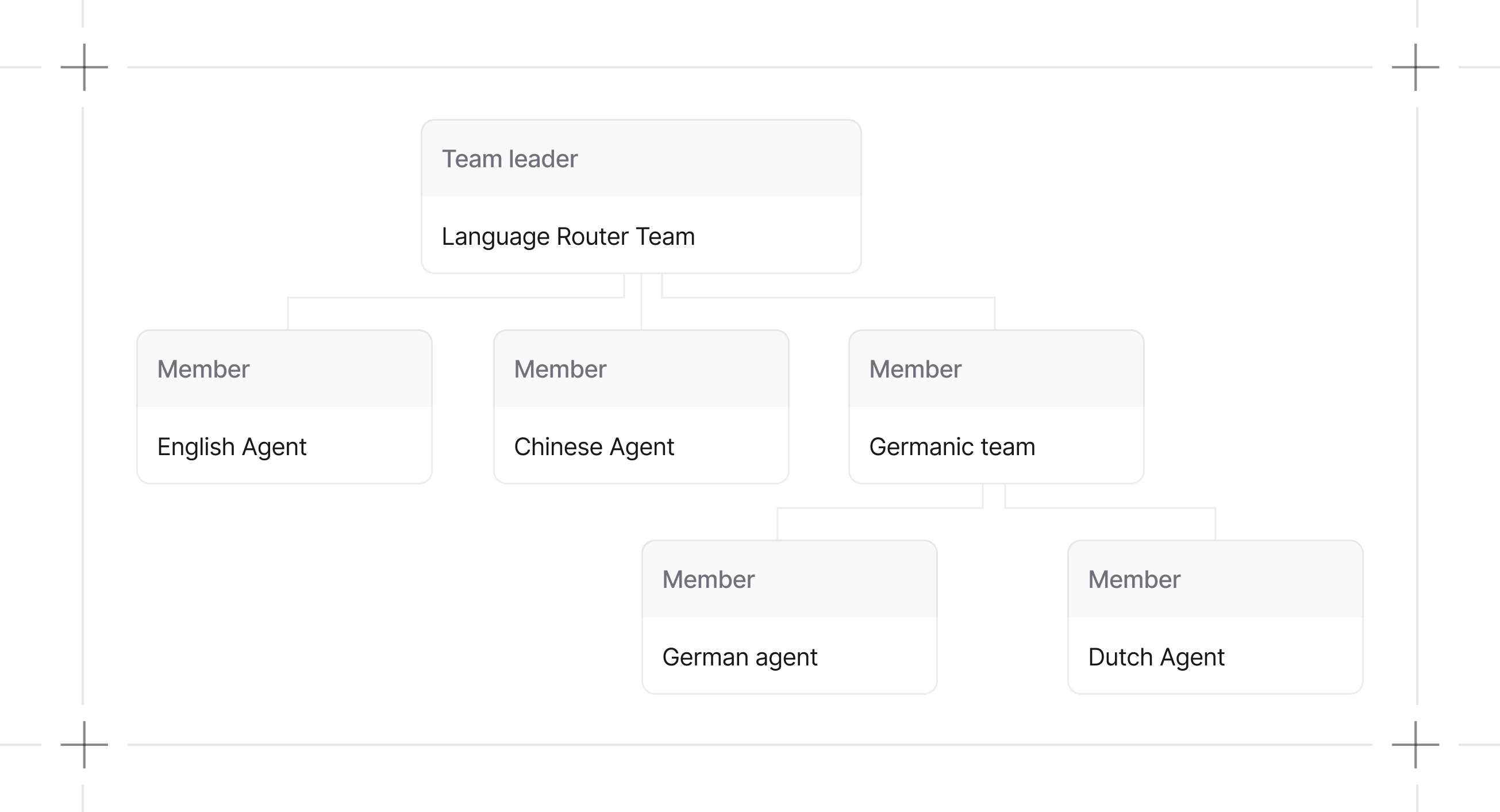
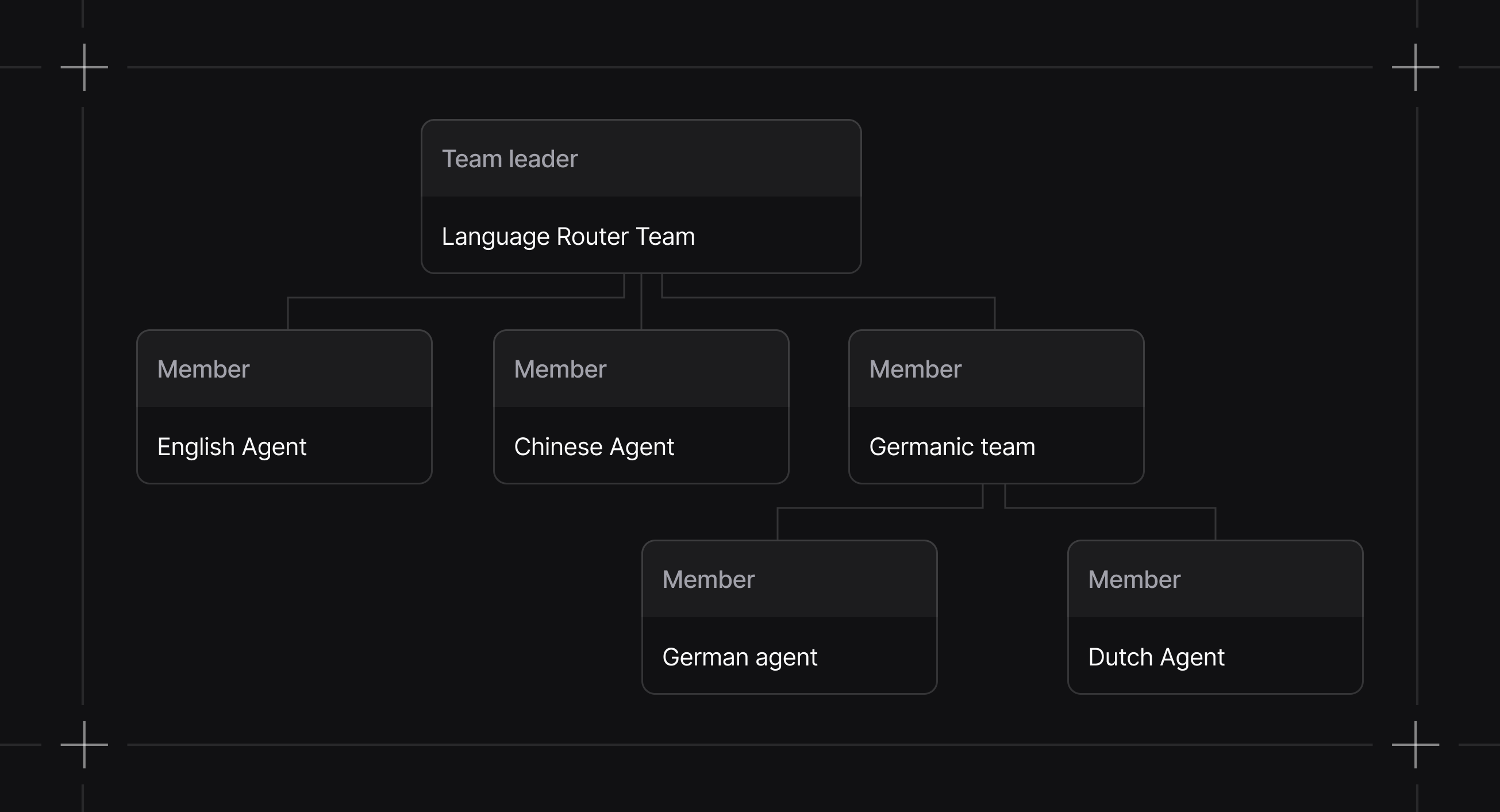 ```python theme={null}
from agno.team import Team
from agno.agent import Agent
team = Team(members=[
Agent(name="English Agent", role="You answer questions in English"),
Agent(name="Chinese Agent", role="You answer questions in Chinese"),
Team(
name="Germanic Team",
role="You coordinate the team members to answer questions in German and Dutch",
members=[
Agent(name="German Agent", role="You answer questions in German"),
Agent(name="Dutch Agent", role="You answer questions in Dutch"),
],
),
])
```
## Why Teams?
Single agents hit limits fast. Context windows fill up, decision-making gets muddy, debugging becomes impossible.
Teams distribute work across specialized agents:
| Benefit | Description |
| ------------------- | --------------------------------------------------------------------- |
| Specialization | Each agent masters one domain instead of being mediocre at everything |
| Parallel processing | Multiple agents work simultaneously on independent subtasks |
| Maintainability | When something breaks, you know exactly which agent to fix |
| Scalability | Add capabilities by adding agents, not rewriting everything |
The tradeoff: coordination overhead. Agents need to communicate and share state. Get this wrong and you've built a more expensive failure mode.
## When to Use Teams
**Use a team when:**
* A task requires multiple specialized agents with different tools or expertise
* A single agent's context window gets exceeded
* You want each agent focused on a narrow scope
**Use a single agent when:**
* The task fits one domain of expertise
* Minimizing token costs matters
* You're not sure yet (start simple, add agents when you hit limits)
## Team Capabilities
### Modular Execution
Agno agents and teams are modular. Message building, session handling, storage, and background managers are separated into dedicated components for separation of coordination logic with the APIs.
### Callable Factories
`knowledge`, `tools`, and `members` all accept callable factories. Agents also support callable factories for `knowledge` and `tools`. See [callable factories](/teams/building-teams#callable-factories) for examples and [caching settings](/teams/building-teams#callable-caching-settings) for cache key configuration.
## Team Modes
Team 2.0 introduces `TeamMode` to make collaboration styles explicit. Prefer `mode=` instead of toggling `respond_directly` or `delegate_to_all_members` directly.
```python theme={null}
from agno.team import Team, TeamMode
team = Team(
name="Research Team",
members=[...],
mode=TeamMode.broadcast,
)
```
Mode selection controls how the leader collaborates with members. `mode` overrides legacy flags. If `mode` is not set, `respond_directly=True` maps to `TeamMode.route`, `delegate_to_all_members=True` maps to `TeamMode.broadcast`, otherwise `TeamMode.coordinate`.
Modes are explicit orchestration patterns. Use them to name and swap coordination topologies without changing agent logic.
Team runs can pause for human-in-the-loop requirements and continue after approval.
See [Delegation](/teams/delegation) for details.
## Guides
Define members, roles, and structure.
Execute teams and handle responses.
Inspect and troubleshoot team behavior.
## Resources
* [Examples](/cookbook/teams/overview)
* [Reference](/reference/teams/team)
```python theme={null}
from agno.team import Team
from agno.agent import Agent
team = Team(members=[
Agent(name="English Agent", role="You answer questions in English"),
Agent(name="Chinese Agent", role="You answer questions in Chinese"),
Team(
name="Germanic Team",
role="You coordinate the team members to answer questions in German and Dutch",
members=[
Agent(name="German Agent", role="You answer questions in German"),
Agent(name="Dutch Agent", role="You answer questions in Dutch"),
],
),
])
```
## Why Teams?
Single agents hit limits fast. Context windows fill up, decision-making gets muddy, debugging becomes impossible.
Teams distribute work across specialized agents:
| Benefit | Description |
| ------------------- | --------------------------------------------------------------------- |
| Specialization | Each agent masters one domain instead of being mediocre at everything |
| Parallel processing | Multiple agents work simultaneously on independent subtasks |
| Maintainability | When something breaks, you know exactly which agent to fix |
| Scalability | Add capabilities by adding agents, not rewriting everything |
The tradeoff: coordination overhead. Agents need to communicate and share state. Get this wrong and you've built a more expensive failure mode.
## When to Use Teams
**Use a team when:**
* A task requires multiple specialized agents with different tools or expertise
* A single agent's context window gets exceeded
* You want each agent focused on a narrow scope
**Use a single agent when:**
* The task fits one domain of expertise
* Minimizing token costs matters
* You're not sure yet (start simple, add agents when you hit limits)
## Team Capabilities
### Modular Execution
Agno agents and teams are modular. Message building, session handling, storage, and background managers are separated into dedicated components for separation of coordination logic with the APIs.
### Callable Factories
`knowledge`, `tools`, and `members` all accept callable factories. Agents also support callable factories for `knowledge` and `tools`. See [callable factories](/teams/building-teams#callable-factories) for examples and [caching settings](/teams/building-teams#callable-caching-settings) for cache key configuration.
## Team Modes
Team 2.0 introduces `TeamMode` to make collaboration styles explicit. Prefer `mode=` instead of toggling `respond_directly` or `delegate_to_all_members` directly.
```python theme={null}
from agno.team import Team, TeamMode
team = Team(
name="Research Team",
members=[...],
mode=TeamMode.broadcast,
)
```
Mode selection controls how the leader collaborates with members. `mode` overrides legacy flags. If `mode` is not set, `respond_directly=True` maps to `TeamMode.route`, `delegate_to_all_members=True` maps to `TeamMode.broadcast`, otherwise `TeamMode.coordinate`.
Modes are explicit orchestration patterns. Use them to name and swap coordination topologies without changing agent logic.
Team runs can pause for human-in-the-loop requirements and continue after approval.
See [Delegation](/teams/delegation) for details.
## Guides
Define members, roles, and structure.
Execute teams and handle responses.
Inspect and troubleshoot team behavior.
## Resources
* [Examples](/cookbook/teams/overview)
* [Reference](/reference/teams/team)