> ## Documentation Index
> Fetch the complete documentation index at: https://docs.agno.com/llms.txt
> Use this file to discover all available pages before exploring further.
# Agent Governance
> Monitor, manage and govern your agents, teams, and workflows from one place.
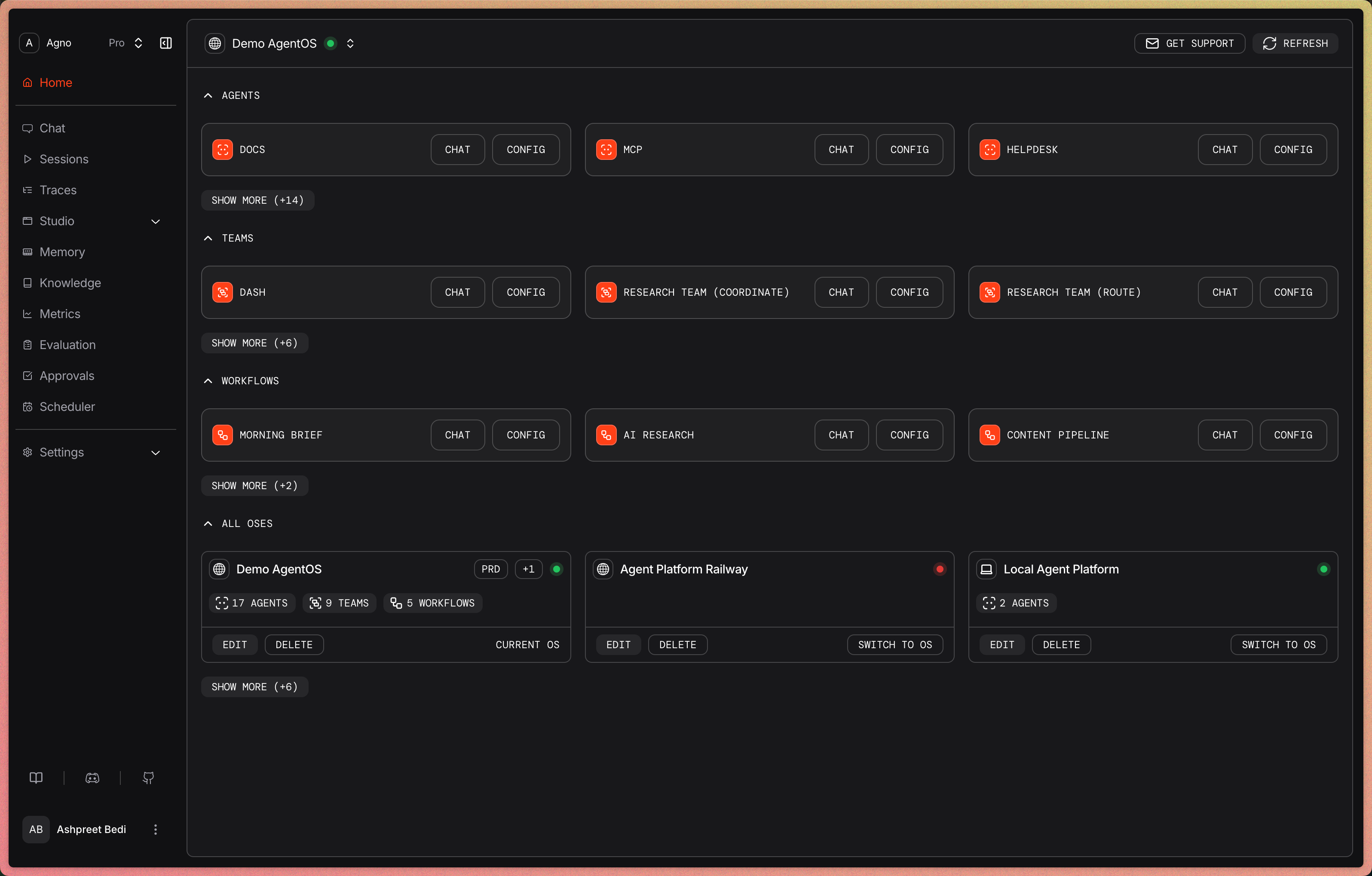
Engineering teams use the AgentOS Control Plane to govern agents, teams, and workflows from development through production. Connect local or deployed runtimes to test components, inspect traces and sessions, manage knowledge and memory, review evaluations and approvals, and operate schedules from one web interface.
 ## Govern the agent lifecycle
Build, test, debug, improve, and operate against local or deployed runtimes.
| Stage | Work in the Control Plane |
| ------- | ------------------------------------------------------------------------------------------------------------------------------------------------------ |
| Build | Compose and version agents, teams, and workflows in Studio from registered models, tools, databases, schemas, and knowledge |
| Test | Run agents and teams, execute workflows, select component versions, and follow streamed output |
| Debug | Open session history and inspect trace trees for instrumented model calls, tool calls, team delegation, workflow steps, token use, latency, and errors |
| Improve | Search knowledge, review or update user memories, and inspect stored evaluations and aggregate usage metrics |
| Operate | Resolve approvals, create or trigger schedules, and switch between local and deployed runtimes |
## Follow every run
Open a session and follow the execution behind its response. Trace trees show the model calls, tool inputs and outputs, team delegation, and workflow steps recorded for the run. Spans show status and timing. Model spans also include token metrics when available.
## Govern the agent lifecycle
Build, test, debug, improve, and operate against local or deployed runtimes.
| Stage | Work in the Control Plane |
| ------- | ------------------------------------------------------------------------------------------------------------------------------------------------------ |
| Build | Compose and version agents, teams, and workflows in Studio from registered models, tools, databases, schemas, and knowledge |
| Test | Run agents and teams, execute workflows, select component versions, and follow streamed output |
| Debug | Open session history and inspect trace trees for instrumented model calls, tool calls, team delegation, workflow steps, token use, latency, and errors |
| Improve | Search knowledge, review or update user memories, and inspect stored evaluations and aggregate usage metrics |
| Operate | Resolve approvals, create or trigger schedules, and switch between local and deployed runtimes |
## Follow every run
Open a session and follow the execution behind its response. Trace trees show the model calls, tool inputs and outputs, team delegation, and workflow steps recorded for the run. Spans show status and timing. Model spans also include token metrics when available.
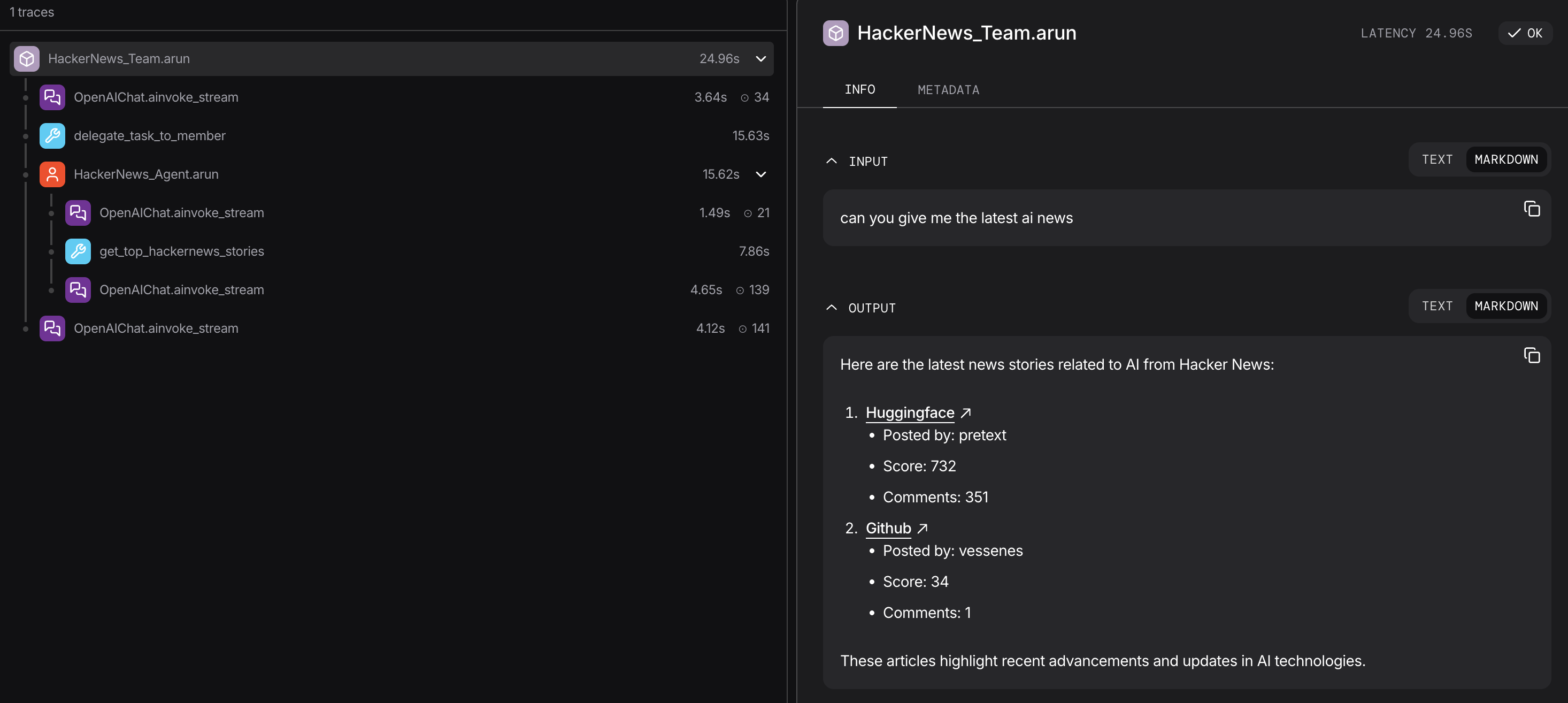 Use the trace to move from an unexpected result to the model call, tool argument, member response, or workflow step that produced it.
## Manage the system behind each run
Compose components from your Registry, save drafts, publish versions, and choose the version served by the API.
Search knowledge content and review or update the user memories exposed by the connected runtime.
Review stored evaluation results and aggregate runtime usage from the configured database.
Inspect tool arguments, approve or reject paused executions, and follow resolution history.
Create recurring runs, trigger them manually, and inspect their execution history.
Follow a first run, review runtime requirements, and open deeper guides.
## Connect your runtimes
Add local, staging, and production AgentOS endpoints to the Control Plane. Select a runtime from the header to change the system you are working on.
The browser sends requests to the selected AgentOS endpoint. That runtime executes components, applies its authorization configuration, and reads or writes the state shown in the UI.
| Layer | Role |
| -------------------- | ----------------------------------------------------------------------------------------------------------- |
| Control Plane | Provides the browser interface and calls the AgentOS endpoint you select |
| AgentOS runtime | Runs agents, teams, and workflows, exposes their APIs, and enforces runtime authorization |
| Configured databases | Store sessions, memories, traces, evaluations, approvals, schedules, metrics, and Studio component versions |
| External services | Models, tools, interfaces, telemetry, and custom exporters follow their own configuration and data paths |
Serve production runtimes over HTTPS and configure [Security & Auth](/agent-os/security/overview) before connecting them.
## Runtime setup
Each Control Plane view depends on capabilities exposed by the connected runtime.
| Capability | Runtime setup |
| -------------------------------------------- | ---------------------------------------------------------- |
| Chat and workflow runs | Agents, teams, or workflows registered with AgentOS |
| Sessions, memories, metrics, and evaluations | An AgentOS database |
| Traces | `tracing=True` and a database available to AgentOS tracing |
| Studio | A `Registry` and a synchronous AgentOS `db` |
| Approvals | An AgentOS `db` and approval-enabled tools |
| Scheduled execution | An AgentOS `db` and `scheduler=True` |
## Developer Resources
* [AgentOS overview](/agent-os/introduction)
* [AgentOS API surface](/features/api)
* [Control Plane guide](/agent-os/control-plane)
* [AgentOS tracing](/agent-os/tracing/overview)
* [Security & Auth](/agent-os/security/overview)
Use the trace to move from an unexpected result to the model call, tool argument, member response, or workflow step that produced it.
## Manage the system behind each run
Compose components from your Registry, save drafts, publish versions, and choose the version served by the API.
Search knowledge content and review or update the user memories exposed by the connected runtime.
Review stored evaluation results and aggregate runtime usage from the configured database.
Inspect tool arguments, approve or reject paused executions, and follow resolution history.
Create recurring runs, trigger them manually, and inspect their execution history.
Follow a first run, review runtime requirements, and open deeper guides.
## Connect your runtimes
Add local, staging, and production AgentOS endpoints to the Control Plane. Select a runtime from the header to change the system you are working on.
The browser sends requests to the selected AgentOS endpoint. That runtime executes components, applies its authorization configuration, and reads or writes the state shown in the UI.
| Layer | Role |
| -------------------- | ----------------------------------------------------------------------------------------------------------- |
| Control Plane | Provides the browser interface and calls the AgentOS endpoint you select |
| AgentOS runtime | Runs agents, teams, and workflows, exposes their APIs, and enforces runtime authorization |
| Configured databases | Store sessions, memories, traces, evaluations, approvals, schedules, metrics, and Studio component versions |
| External services | Models, tools, interfaces, telemetry, and custom exporters follow their own configuration and data paths |
Serve production runtimes over HTTPS and configure [Security & Auth](/agent-os/security/overview) before connecting them.
## Runtime setup
Each Control Plane view depends on capabilities exposed by the connected runtime.
| Capability | Runtime setup |
| -------------------------------------------- | ---------------------------------------------------------- |
| Chat and workflow runs | Agents, teams, or workflows registered with AgentOS |
| Sessions, memories, metrics, and evaluations | An AgentOS database |
| Traces | `tracing=True` and a database available to AgentOS tracing |
| Studio | A `Registry` and a synchronous AgentOS `db` |
| Approvals | An AgentOS `db` and approval-enabled tools |
| Scheduled execution | An AgentOS `db` and `scheduler=True` |
## Developer Resources
* [AgentOS overview](/agent-os/introduction)
* [AgentOS API surface](/features/api)
* [Control Plane guide](/agent-os/control-plane)
* [AgentOS tracing](/agent-os/tracing/overview)
* [Security & Auth](/agent-os/security/overview)