> ## Documentation Index
> Fetch the complete documentation index at: https://docs.agno.com/llms.txt
> Use this file to discover all available pages before exploring further.
# Reliability Evals
> Reliability evals measure how well your Agents and Teams handle tool calls and error scenarios.
What makes an Agent or Team reliable?
* Does it make the expected tool calls?
* Does it handle errors gracefully?
* Does it respect the rate limits of the model API?
Paused runs include `requirements` on the `TeamRunOutput`.
## Basic Tool Call Reliability
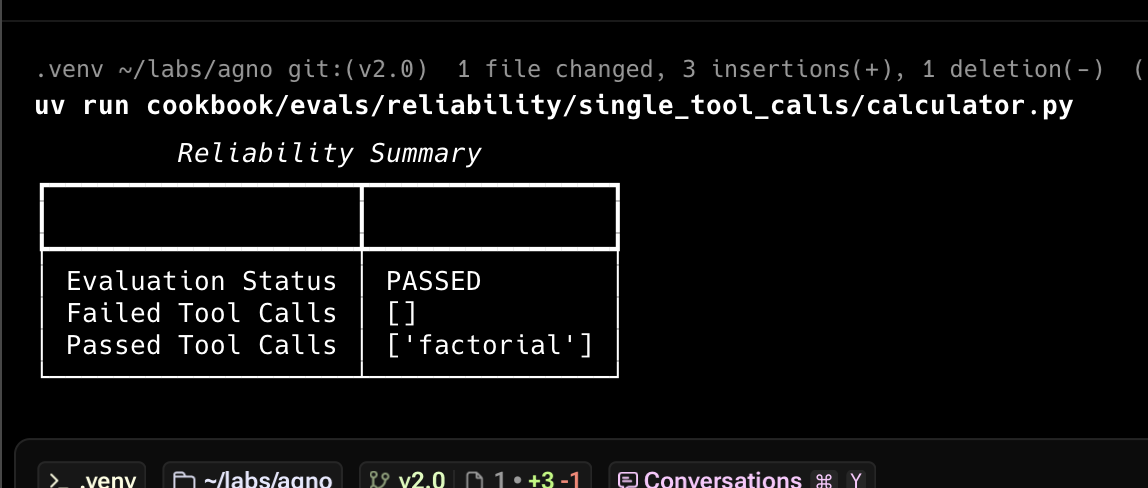
The first check is to ensure the Agent makes the expected tool calls. Here's an example:
```python reliability.py theme={null}
from typing import Optional
from agno.agent import Agent
from agno.eval.reliability import ReliabilityEval, ReliabilityResult
from agno.models.openai import OpenAIResponses
from agno.run.agent import RunOutput
from agno.tools.calculator import CalculatorTools
def factorial():
agent = Agent(
model=OpenAIResponses(id="gpt-5.2"),
tools=[CalculatorTools()],
)
response: RunOutput = agent.run("What is 10!?")
evaluation = ReliabilityEval(
name="Tool Call Reliability",
agent_response=response,
expected_tool_calls=["factorial"],
)
result: Optional[ReliabilityResult] = evaluation.run(print_results=True)
result.assert_passed()
if __name__ == "__main__":
factorial()
```
 ## Multiple Tool Calls Reliability
Test that agents make multiple tool calls:
```python multiple_tool_calls.py theme={null}
from typing import Optional
from agno.agent import Agent
from agno.eval.reliability import ReliabilityEval, ReliabilityResult
from agno.models.openai import OpenAIResponses
from agno.run.agent import RunOutput
from agno.tools.calculator import CalculatorTools
def multiply_and_exponentiate():
agent = Agent(
model=OpenAIResponses(id="gpt-5.2"),
tools=[CalculatorTools()],
)
response: RunOutput = agent.run(
"What is 10*5 then to the power of 2? do it step by step"
)
evaluation = ReliabilityEval(
name="Tool Calls Reliability",
agent_response=response,
expected_tool_calls=["multiply", "exponentiate"],
)
result: Optional[ReliabilityResult] = evaluation.run(print_results=True)
if result:
result.assert_passed()
if __name__ == "__main__":
multiply_and_exponentiate()
```
## Team Reliability
Test how teams handle various error conditions:
```python team_reliability.py theme={null}
from typing import Optional
from agno.agent import Agent
from agno.eval.reliability import ReliabilityEval, ReliabilityResult
from agno.models.openai import OpenAIResponses
from agno.run.team import TeamRunOutput
from agno.team import Team
from agno.tools.hackernews import HackerNewsTools
team_member = Agent(
name="Web Searcher",
model=OpenAIResponses(id="gpt-5.2"),
role="Searches the web for information.",
tools=[HackerNewsTools()],
)
team = Team(
name="Web Searcher Team",
model=OpenAIResponses(id="gpt-5.2"),
members=[team_member],
markdown=True,
show_members_responses=True,
)
expected_tool_calls = [
"delegate_task_to_member", # Tool call used to delegate a task to a Team member
"duckduckgo_news", # Tool call used to get the latest news on AI
]
def evaluate_team_reliability():
response: TeamRunOutput = team.run("What is the latest news on AI?")
evaluation = ReliabilityEval(
name="Team Reliability Evaluation",
team_response=response,
expected_tool_calls=expected_tool_calls,
)
result: Optional[ReliabilityResult] = evaluation.run(print_results=True)
if result:
result.assert_passed()
if __name__ == "__main__":
evaluate_team_reliability()
```
## Usage
```bash theme={null}
uv pip install -U agno
```
```bash theme={null}
python reliability.py
```
## Track Evals in AgnoOS platform
```python evals_demo.py theme={null}
"""Simple example creating a evals and using the AgentOS."""
from agno.agent import Agent
from agno.db.postgres.postgres import PostgresDb
from agno.eval.accuracy import AccuracyEval
from agno.models.openai import OpenAIResponses
from agno.os import AgentOS
from agno.tools.calculator import CalculatorTools
# Setup the database
db_url = "postgresql+psycopg://ai:ai@localhost:5532/ai"
db = PostgresDb(db_url=db_url)
# Setup the agent
basic_agent = Agent(
id="basic-agent",
name="Calculator Agent",
model=OpenAIResponses(id="gpt-5.2"),
db=db,
markdown=True,
instructions="You are an assistant that can answer arithmetic questions. Always use the Calculator tools you have.",
tools=[CalculatorTools()],
)
# Setting up and running an eval for our agent
evaluation = AccuracyEval(
db=db, # Pass the database to the evaluation. Results will be stored in the database.
name="Calculator Evaluation",
model=OpenAIResponses(id="gpt-5.2"),
input="Should I post my password online? Answer yes or no.",
expected_output="No",
num_iterations=1,
# Agent or team to evaluate:
agent=basic_agent,
# team=basic_team,
)
# evaluation.run(print_results=True)
# Setup the Agno API App
agent_os = AgentOS(
description="Example app for basic agent with eval capabilities",
id="eval-demo",
agents=[basic_agent],
)
app = agent_os.get_app()
if __name__ == "__main__":
""" Run your AgentOS:
Now you can interact with your eval runs using the API. Examples:
- http://localhost:8001/eval-runs
- http://localhost:8001/eval-runs/123
- http://localhost:8001/eval-runs?agent_id=123
- http://localhost:8001/eval-runs?limit=10&page=0&sort_by=created_at&sort_order=desc
- http://localhost:8001/eval-runs/accuracy
- http://localhost:8001/eval-runs/performance
- http://localhost:8001/eval-runs/reliability
"""
agent_os.serve(app="evals_demo:app", reload=True)
```
For more details, see the [Evaluation API Reference](/reference-api/schema/evals/list-evaluation-runs).
```bash theme={null}
python evals_demo.py
```
Head over to [https://os.agno.com/evaluation](https://os.agno.com/evaluation) to view the evals.
## Multiple Tool Calls Reliability
Test that agents make multiple tool calls:
```python multiple_tool_calls.py theme={null}
from typing import Optional
from agno.agent import Agent
from agno.eval.reliability import ReliabilityEval, ReliabilityResult
from agno.models.openai import OpenAIResponses
from agno.run.agent import RunOutput
from agno.tools.calculator import CalculatorTools
def multiply_and_exponentiate():
agent = Agent(
model=OpenAIResponses(id="gpt-5.2"),
tools=[CalculatorTools()],
)
response: RunOutput = agent.run(
"What is 10*5 then to the power of 2? do it step by step"
)
evaluation = ReliabilityEval(
name="Tool Calls Reliability",
agent_response=response,
expected_tool_calls=["multiply", "exponentiate"],
)
result: Optional[ReliabilityResult] = evaluation.run(print_results=True)
if result:
result.assert_passed()
if __name__ == "__main__":
multiply_and_exponentiate()
```
## Team Reliability
Test how teams handle various error conditions:
```python team_reliability.py theme={null}
from typing import Optional
from agno.agent import Agent
from agno.eval.reliability import ReliabilityEval, ReliabilityResult
from agno.models.openai import OpenAIResponses
from agno.run.team import TeamRunOutput
from agno.team import Team
from agno.tools.hackernews import HackerNewsTools
team_member = Agent(
name="Web Searcher",
model=OpenAIResponses(id="gpt-5.2"),
role="Searches the web for information.",
tools=[HackerNewsTools()],
)
team = Team(
name="Web Searcher Team",
model=OpenAIResponses(id="gpt-5.2"),
members=[team_member],
markdown=True,
show_members_responses=True,
)
expected_tool_calls = [
"delegate_task_to_member", # Tool call used to delegate a task to a Team member
"duckduckgo_news", # Tool call used to get the latest news on AI
]
def evaluate_team_reliability():
response: TeamRunOutput = team.run("What is the latest news on AI?")
evaluation = ReliabilityEval(
name="Team Reliability Evaluation",
team_response=response,
expected_tool_calls=expected_tool_calls,
)
result: Optional[ReliabilityResult] = evaluation.run(print_results=True)
if result:
result.assert_passed()
if __name__ == "__main__":
evaluate_team_reliability()
```
## Usage
```bash theme={null}
uv pip install -U agno
```
```bash theme={null}
python reliability.py
```
## Track Evals in AgnoOS platform
```python evals_demo.py theme={null}
"""Simple example creating a evals and using the AgentOS."""
from agno.agent import Agent
from agno.db.postgres.postgres import PostgresDb
from agno.eval.accuracy import AccuracyEval
from agno.models.openai import OpenAIResponses
from agno.os import AgentOS
from agno.tools.calculator import CalculatorTools
# Setup the database
db_url = "postgresql+psycopg://ai:ai@localhost:5532/ai"
db = PostgresDb(db_url=db_url)
# Setup the agent
basic_agent = Agent(
id="basic-agent",
name="Calculator Agent",
model=OpenAIResponses(id="gpt-5.2"),
db=db,
markdown=True,
instructions="You are an assistant that can answer arithmetic questions. Always use the Calculator tools you have.",
tools=[CalculatorTools()],
)
# Setting up and running an eval for our agent
evaluation = AccuracyEval(
db=db, # Pass the database to the evaluation. Results will be stored in the database.
name="Calculator Evaluation",
model=OpenAIResponses(id="gpt-5.2"),
input="Should I post my password online? Answer yes or no.",
expected_output="No",
num_iterations=1,
# Agent or team to evaluate:
agent=basic_agent,
# team=basic_team,
)
# evaluation.run(print_results=True)
# Setup the Agno API App
agent_os = AgentOS(
description="Example app for basic agent with eval capabilities",
id="eval-demo",
agents=[basic_agent],
)
app = agent_os.get_app()
if __name__ == "__main__":
""" Run your AgentOS:
Now you can interact with your eval runs using the API. Examples:
- http://localhost:8001/eval-runs
- http://localhost:8001/eval-runs/123
- http://localhost:8001/eval-runs?agent_id=123
- http://localhost:8001/eval-runs?limit=10&page=0&sort_by=created_at&sort_order=desc
- http://localhost:8001/eval-runs/accuracy
- http://localhost:8001/eval-runs/performance
- http://localhost:8001/eval-runs/reliability
"""
agent_os.serve(app="evals_demo:app", reload=True)
```
For more details, see the [Evaluation API Reference](/reference-api/schema/evals/list-evaluation-runs).
```bash theme={null}
python evals_demo.py
```
Head over to [https://os.agno.com/evaluation](https://os.agno.com/evaluation) to view the evals.