> ## Documentation Index
> Fetch the complete documentation index at: https://docs.agno.com/llms.txt
> Use this file to discover all available pages before exploring further.
# Connect to Control Plane
> Connect your AgentOS to os.agno.com
Connect your AWS deployment to [os.agno.com](https://os.agno.com) to monitor and manage your agents.
## Prerequisites
Before connecting, ensure:
| Requirement | Check |
| --------------------- | ------------------------------------------------ |
| Deployment is running | `curl https://your-domain.com/health` returns OK |
| HTTPS is configured | URL starts with `https://` |
| Certificate is valid | No browser warnings when visiting your domain |
HTTPS is required. If you haven't set it up yet, see [Add
HTTPS](/deploy/templates/aws/go-live/https).
## Connect Your AgentOS
Go to [os.agno.com](https://os.agno.com) and sign in.
Click "Connect OS" and select "Live".
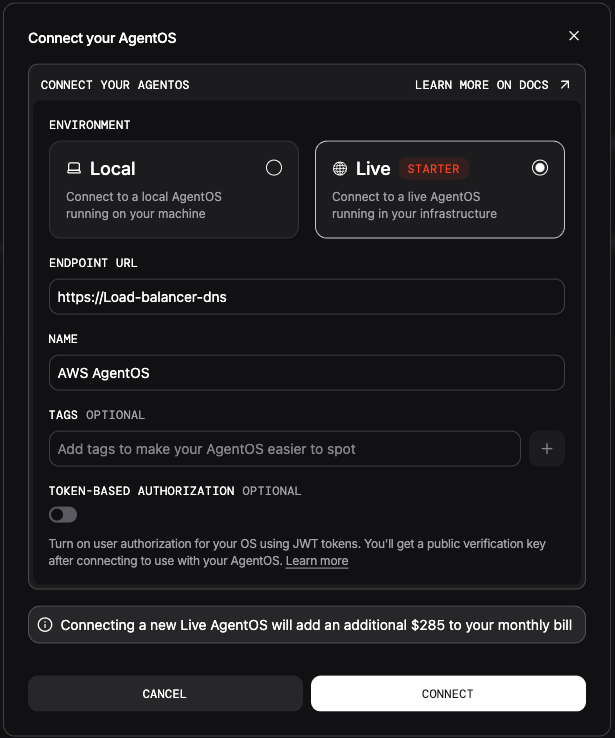 Enter your production URL: `https://api.yourdomain.com`
The instance should show "Connected" status.
## Verify Connection
Once connected, you should see:
* Your agents listed in the dashboard
* Real-time status updates
* Ability to interact with your agents
## Troubleshooting
| Status | Cause | Solution |
| -------------------- | -------------------- | --------------------------------------- |
| "Unhealthy" | Health check failing | Check `/health` endpoint returns 200 |
| "Unreachable" | Network issue | Verify HTTPS certificate is valid |
| "Connection refused" | Firewall blocking | Check security group allows inbound 443 |
### Check from os.agno.com's perspective
Your endpoint must be publicly accessible. Test from outside your network:
```bash theme={null}
curl -I https://api.yourdomain.com/health
```
Should return `HTTP/2 200`.
## Next Steps
Create agents with your own tools and prompts.
Slack, GitHub, databases, and 100+ integrations.
Load documents, websites, and databases for RAG.
Deploy to Slack, Discord, WhatsApp, or expose via MCP.
Enter your production URL: `https://api.yourdomain.com`
The instance should show "Connected" status.
## Verify Connection
Once connected, you should see:
* Your agents listed in the dashboard
* Real-time status updates
* Ability to interact with your agents
## Troubleshooting
| Status | Cause | Solution |
| -------------------- | -------------------- | --------------------------------------- |
| "Unhealthy" | Health check failing | Check `/health` endpoint returns 200 |
| "Unreachable" | Network issue | Verify HTTPS certificate is valid |
| "Connection refused" | Firewall blocking | Check security group allows inbound 443 |
### Check from os.agno.com's perspective
Your endpoint must be publicly accessible. Test from outside your network:
```bash theme={null}
curl -I https://api.yourdomain.com/health
```
Should return `HTTP/2 200`.
## Next Steps
Create agents with your own tools and prompts.
Slack, GitHub, databases, and 100+ integrations.
Load documents, websites, and databases for RAG.
Deploy to Slack, Discord, WhatsApp, or expose via MCP.