> ## Documentation Index
> Fetch the complete documentation index at: https://docs.agno.com/llms.txt
> Use this file to discover all available pages before exploring further.
# Production Application
Your production application runs on AWS and its resources are defined in the `infra/prd_resources.py` file. This guide shows how to:
1. [Build a production image](#build-your-production-image)
2. [Update ECS Task Definitions](#ecs-task-definition)
3. [Update ECS Services](#ecs-service)
## Workspace Settings
The `InfraSettings` object in the `infra/settings.py` file defines common settings used by your workspace apps and resources.
## Build your production image
Your application uses the `agno` images by default. To use your own image:
* Create a Repository in `ECR` and authenticate or use `Dockerhub`.
* Open `infra/settings.py` file
* Update the `image_repo` to your image repository
* Set `build_images=True` and `push_images=True`
* Optional - Set `build_images=False` and `push_images=False` to use an existing image in the repository
### Create an ECR Repository
To use ECR, **create the image repo and authenticate with ECR** before pushing images.
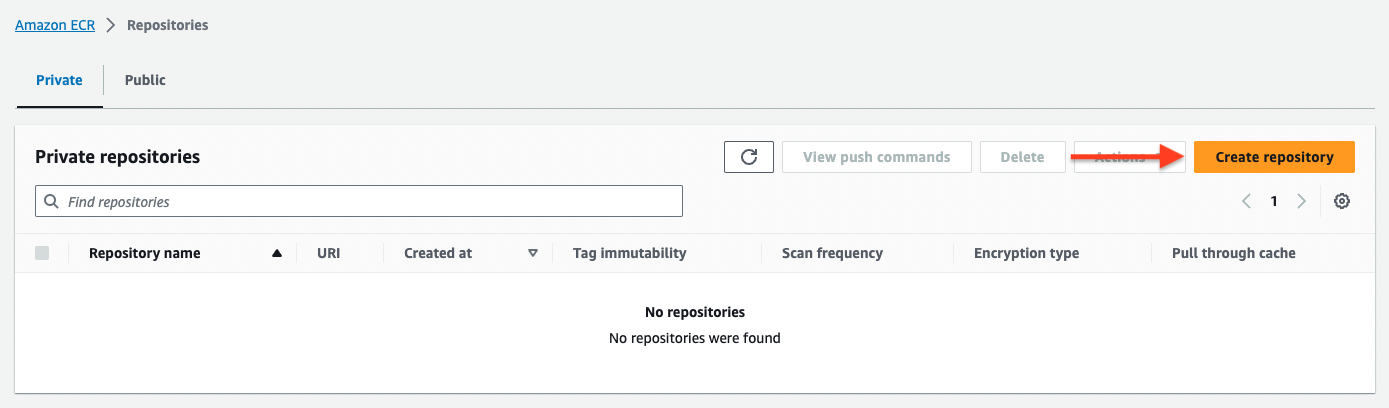
**1. Create the image repository in ECR**
The repo name should match the `image_name` in `settings.py` (default: `agentos-aws-template`).
 **2. Authenticate with ECR**
```bash Authenticate with ECR theme={null}
aws ecr get-login-password --region [region] | docker login --username AWS --password-stdin [account].dkr.ecr.[region].amazonaws.com
```
You can also use a helper script to avoid running the full command
Update the script with your ECR repo before running.
```bash Mac theme={null}
./scripts/auth_ecr.sh
```
### Update the `InfraSettings`
```python infra/settings.py theme={null}
infra_settings = InfraSettings(
...
# Subnet IDs in the aws_region
aws_subnet_ids=["subnet-xyz", "subnet-xyz"],
# -*- Image Settings
# Repository for images
image_repo="your-image-repo",
# Build images locally
build_images=True,
# Push images after building
push_images=True,
)
```
The `image_repo` defines the repo for your image.
* If using dockerhub it would be something like `agno`.
* If using ECR it would be something like `[ACCOUNT_ID].dkr.ecr.us-east-1.amazonaws.com`
### Build a new image
Build the production image using:
```bash terminal theme={null}
ag infra up --env prd --infra docker --type image
```
```bash short options theme={null}
ag infra up -e prd -i docker -t image
```
To `force` rebuild images, use the `--force` or `-f` flag
```bash terminal theme={null}
ag infra up --env prd --infra docker --type image --force
```
```bash short options theme={null}
ag infra up -e prd -i docker -t image -f
```
Because the only docker resources in the production env are docker images, you can also use:
```bash Build Images theme={null}
ag infra up prd:docker
```
```bash Force Build Images theme={null}
ag infra up prd:docker -f
```
## ECS Task Definition
If you updated the Image, CPU, Memory or Environment Variables, update the Task Definition using:
```bash Full Options theme={null}
ag infra patch --env prd --infra aws --name td
```
```bash Shorthand theme={null}
ag infra patch prd:aws::td
```
## ECS Service
To redeploy the production application, update the ECS Service using:
```bash Full Options theme={null}
ag infra patch --env prd --infra aws --name service
```
```bash Shorthand theme={null}
ag infra patch prd:aws::service
```
**2. Authenticate with ECR**
```bash Authenticate with ECR theme={null}
aws ecr get-login-password --region [region] | docker login --username AWS --password-stdin [account].dkr.ecr.[region].amazonaws.com
```
You can also use a helper script to avoid running the full command
Update the script with your ECR repo before running.
```bash Mac theme={null}
./scripts/auth_ecr.sh
```
### Update the `InfraSettings`
```python infra/settings.py theme={null}
infra_settings = InfraSettings(
...
# Subnet IDs in the aws_region
aws_subnet_ids=["subnet-xyz", "subnet-xyz"],
# -*- Image Settings
# Repository for images
image_repo="your-image-repo",
# Build images locally
build_images=True,
# Push images after building
push_images=True,
)
```
The `image_repo` defines the repo for your image.
* If using dockerhub it would be something like `agno`.
* If using ECR it would be something like `[ACCOUNT_ID].dkr.ecr.us-east-1.amazonaws.com`
### Build a new image
Build the production image using:
```bash terminal theme={null}
ag infra up --env prd --infra docker --type image
```
```bash short options theme={null}
ag infra up -e prd -i docker -t image
```
To `force` rebuild images, use the `--force` or `-f` flag
```bash terminal theme={null}
ag infra up --env prd --infra docker --type image --force
```
```bash short options theme={null}
ag infra up -e prd -i docker -t image -f
```
Because the only docker resources in the production env are docker images, you can also use:
```bash Build Images theme={null}
ag infra up prd:docker
```
```bash Force Build Images theme={null}
ag infra up prd:docker -f
```
## ECS Task Definition
If you updated the Image, CPU, Memory or Environment Variables, update the Task Definition using:
```bash Full Options theme={null}
ag infra patch --env prd --infra aws --name td
```
```bash Shorthand theme={null}
ag infra patch prd:aws::td
```
## ECS Service
To redeploy the production application, update the ECS Service using:
```bash Full Options theme={null}
ag infra patch --env prd --infra aws --name service
```
```bash Shorthand theme={null}
ag infra patch prd:aws::service
```
If you **ONLY** rebuilt the image, you do not need to update the task definition and can just patch the service to pickup the new image.