> ## Documentation Index
> Fetch the complete documentation index at: https://docs.agno.com/llms.txt
> Use this file to discover all available pages before exploring further.
# Run Locally
> Run your agent platform locally.
Today we're going to run an agent platform made of:
* AgentOS on FastAPI
* Postgres + PgVector
Two containers. Stateless FastAPI in front of Postgres, the same stack you run in production.
## Prerequisites
* [Docker Desktop](https://docs.docker.com/desktop/) installed and running
* An [OpenAI API key](https://platform.openai.com/api-keys) for models and embeddings
## Run your agent platform
```bash theme={null}
git clone https://github.com/agno-agi/agent-platform-railway.git agent-platform
cd agent-platform
```
To make this codebase yours, run `rm -rf .git` and push to your own git repo.
```bash theme={null}
cp example.env .env
```
Open `.env` and set `OPENAI_API_KEY`. Everything else has sensible defaults.
```bash theme={null}
docker compose up -d --build
```
This runs two containers: a FastAPI app on port 8000 and a Postgres on port 5432.
Open [http://localhost:8000/docs](http://localhost:8000/docs).
You'll see the OpenAPI spec: every agent action exposed as a REST endpoint.
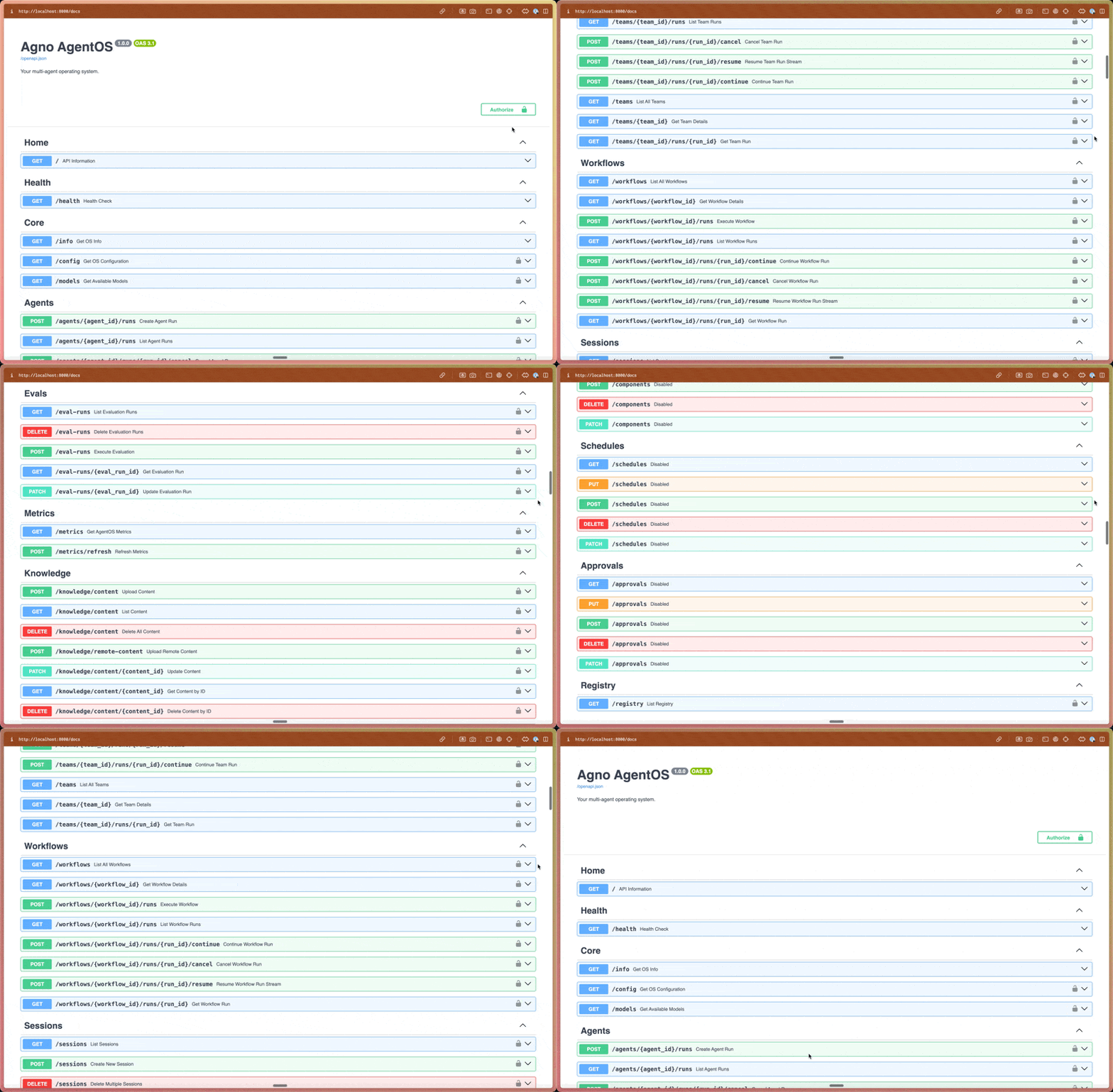 You now have an agent platform made of AgentOS on FastAPI and Postgres. The AgentOS server exposes 50+ actions through a REST API.
AgentOS also comes with a UI at [os.agno.com](https://os.agno.com).
## Connect the AgentOS UI
1. Open [os.agno.com](https://os.agno.com) and log in.
2. Click **Connect OS**, choose **Local**, enter `http://localhost:8000` as the URL, and name it **Local AgentOS**.
3. Click **Connect**.
You should see two agents:
| Agent | Pattern | What it does |
| ---------------- | ---------------- | ---------------------------------------------------------------------- |
| **code\_search** | Context provider | Reads files in the workspace and answers questions about the codebase. |
| **web\_search** | Direct tools | Searches the web and synthesizes answers grounded in citations. |
Try a prompt against each:
> *"What's in this repo?"* → `code_search` lists the directory and explains the structure.
> *"What did Anthropic publish about agents recently?"* → `web_search` returns a summary.
Open **Sessions** and **Traces** in the sidebar. Every run is captured with full message history, tool calls, and timing. This is what powers the iteration loop on the next page.
## Summary
We now have a locally running agent platform with:
* Our agent runtime (AgentOS) running on port 8000 with request isolation, session management, scheduling, and 50+ endpoints.
* A Postgres database for storing sessions, memory, knowledge, and traces.
* A `docs/` folder of Claude Code prompts for managing the entire agent development lifecycle: create, improve, extend, eval, and review.
Hot-reload is on. Edits to `agents/*.py` and `app/*.py` should be live in \~2s.
## Next
[Create an agent →](/agent-platform/create-agent)
You now have an agent platform made of AgentOS on FastAPI and Postgres. The AgentOS server exposes 50+ actions through a REST API.
AgentOS also comes with a UI at [os.agno.com](https://os.agno.com).
## Connect the AgentOS UI
1. Open [os.agno.com](https://os.agno.com) and log in.
2. Click **Connect OS**, choose **Local**, enter `http://localhost:8000` as the URL, and name it **Local AgentOS**.
3. Click **Connect**.
You should see two agents:
| Agent | Pattern | What it does |
| ---------------- | ---------------- | ---------------------------------------------------------------------- |
| **code\_search** | Context provider | Reads files in the workspace and answers questions about the codebase. |
| **web\_search** | Direct tools | Searches the web and synthesizes answers grounded in citations. |
Try a prompt against each:
> *"What's in this repo?"* → `code_search` lists the directory and explains the structure.
> *"What did Anthropic publish about agents recently?"* → `web_search` returns a summary.
Open **Sessions** and **Traces** in the sidebar. Every run is captured with full message history, tool calls, and timing. This is what powers the iteration loop on the next page.
## Summary
We now have a locally running agent platform with:
* Our agent runtime (AgentOS) running on port 8000 with request isolation, session management, scheduling, and 50+ endpoints.
* A Postgres database for storing sessions, memory, knowledge, and traces.
* A `docs/` folder of Claude Code prompts for managing the entire agent development lifecycle: create, improve, extend, eval, and review.
Hot-reload is on. Edits to `agents/*.py` and `app/*.py` should be live in \~2s.
## Next
[Create an agent →](/agent-platform/create-agent)