> ## Documentation Index
> Fetch the complete documentation index at: https://docs.agno.com/llms.txt
> Use this file to discover all available pages before exploring further.
# Role-Based Access Control (RBAC)
> Secure your AgentOS with fine-grained permissions.
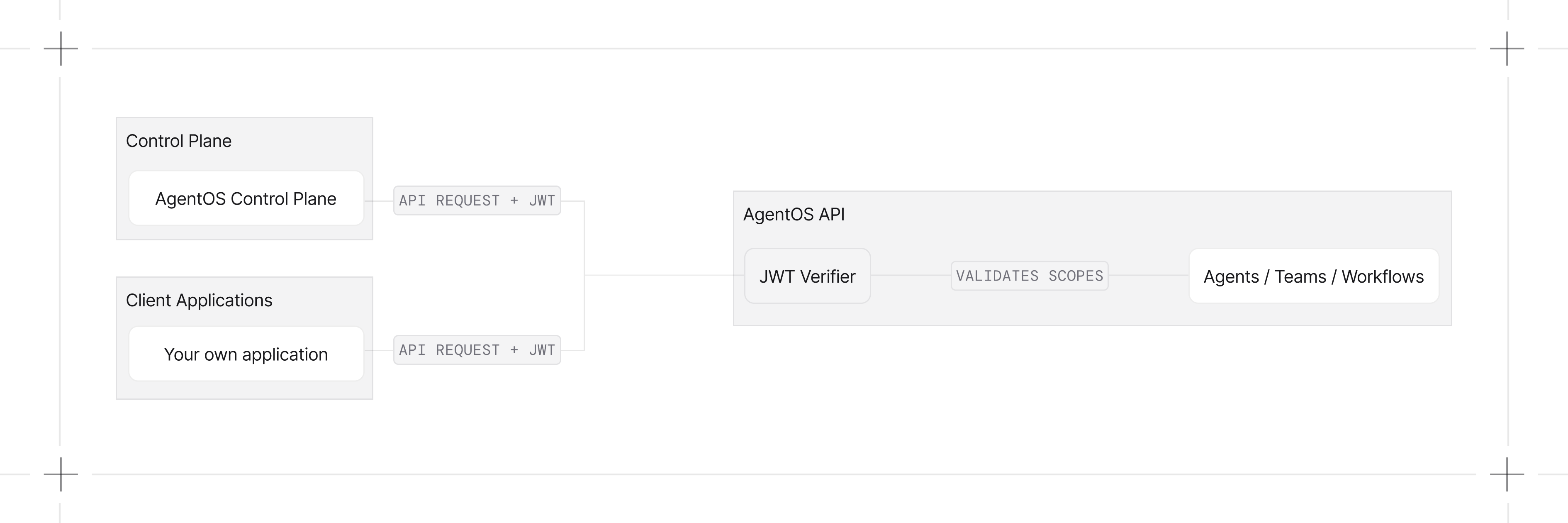
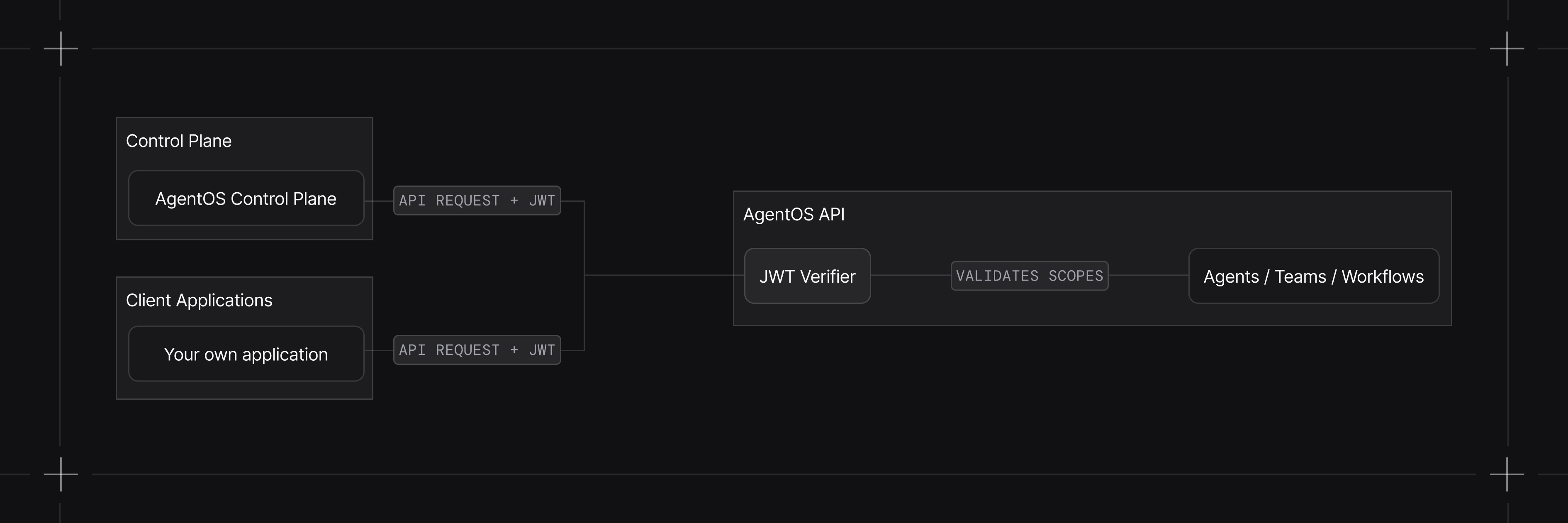
AgentOS validates the JWT on every request, then checks its scopes against the permissions each endpoint requires. This controls who can access and run your agents, teams, and workflows.
 ## Quick Start
Enable RBAC when initializing AgentOS:
```python theme={null}
from agno.agent import Agent
from agno.models.openai import OpenAIResponses
from agno.os import AgentOS
agent = Agent(
id="my-agent",
model=OpenAIResponses(id="gpt-5.2"),
)
agent_os = AgentOS(
id="my-agent-os",
agents=[agent],
authorization=True,
)
app = agent_os.get_app()
```
## Generate a Verification Key
`authorization=True` only tells AgentOS to enforce JWT authorization. To verify tokens, AgentOS also needs a public key. Generate one from the control plane and wire it in.
Enable JWT authorization when connecting a new AgentOS, or later from the OS Settings page.
Copy the public key for your AgentOS from the modal
Set the `JWT_VERIFICATION_KEY` environment variable to your public key in your `.env` file or export it directly in your terminal:
```bash theme={null}
export JWT_VERIFICATION_KEY="your-public-key"
```
Or, if you manage keys via a JWKS file, point AgentOS at it instead:
```bash theme={null}
export JWT_JWKS_FILE="/path/to/jwks.json"
```
Authorization is now active for your AgentOS.
The control plane only issues **RS256** keys, which is also the default. See [authorization troubleshooting](/faq/rbac-auth-failed) for common setup issues.
## Configuration Options
Configure JWT verification using `AuthorizationConfig`:
```python theme={null}
from agno.os import AgentOS
from agno.os.config import AuthorizationConfig
agent_os = AgentOS(
id="my-agent-os",
agents=[agent],
authorization=True,
authorization_config=AuthorizationConfig(
verification_keys=["your-jwt-verification-key"],
algorithm="RS256",
),
)
```
You can also use a JWKS file:
```python theme={null}
authorization_config=AuthorizationConfig(
jwks_file="/path/to/jwks.json",
algorithm="RS256",
)
```
Or set environment variables:
```bash theme={null}
export JWT_VERIFICATION_KEY="your-public-key"
# or
export JWT_JWKS_FILE="/path/to/jwks.json"
```
## Running AgentOS Independently
The control plane is one way to issue verification keys, not the only way. AgentOS verifies any JWT signed with a key you provide, so you can mint and verify tokens entirely on your own infrastructure.
### Issuing tokens
AgentOS verifies tokens but doesn't issue them. Generate them in your backend or identity provider, signed with the key whose public half or shared secret you set as a verification key. Include the claims from [JWT Token Structure](#jwt-token-structure); `scopes` is the claim RBAC checks.
Send the token in the `Authorization` header:
```bash theme={null}
curl -H "Authorization: Bearer $TOKEN" http://localhost:7777/agents
```
See the [Basic RBAC (Symmetric)](/agent-os/usage/rbac/basic-symmetric) and [Basic RBAC (Asymmetric)](/agent-os/usage/rbac/basic-asymmetric) examples for generating signed tokens end to end.
### Accepting multiple issuers
`verification_keys` is a list. AgentOS tries each key in order until one verifies the token. Pass a second key to accept tokens from both the Agno control plane and your own backend at the same time.
```python theme={null}
authorization_config=AuthorizationConfig(
verification_keys=[
AGNO_CONTROL_PLANE_PUBLIC_KEY, # tokens issued by os.agno.com
YOUR_BACKEND_PUBLIC_KEY, # tokens minted by your service
],
algorithm="RS256",
)
```
This keeps the AgentOS UI working through the control plane while your backend mints its own tokens for service-to-service or production traffic. All keys in the list must use the algorithm set in `algorithm`.
## JWT Token Structure
Your JWT tokens should include:
```json theme={null}
{
"sub": "user-123",
"scopes": ["agents:read", "agents:my-agent:run"],
"exp": 1735689600,
"iat": 1735603200
}
```
| Claim | Required | Description |
| ------------ | -------- | -------------------------------------------------------------- |
| `scopes` | Yes | Array of permission scopes |
| `sub` | No | User ID (extracted as `user_id`) |
| `session_id` | No | Session ID for session tracking |
| `aud` | No | Audience (must match AgentOS `id` when `verify_audience=True`) |
| `exp` | No | Expiry timestamp. Recommended; expired tokens are rejected. |
| `iat` | No | Issued-at timestamp. |
### Example Tokens
**Read-only access:**
```json theme={null}
{
"scopes": ["agents:read", "teams:read", "sessions:read"]
}
```
**Run a specific agent:**
```json theme={null}
{
"scopes": ["agents:my-agent:run", "agents:my-agent:read", "sessions:write"]
}
```
**Admin access:**
```json theme={null}
{
"scopes": ["agent_os:admin"]
}
```
## Scope Format
RBAC uses a hierarchical scope format:
| Format | Example | Description |
| ---------------------- | --------------------- | ------------------------------- |
| `resource:action` | `agents:read` | Access all resources of a type |
| `resource::action` | `agents:my-agent:run` | Access a specific resource |
| `resource:*:action` | `agents:*:read` | Wildcard (equivalent to global) |
| `agent_os:admin` | - | Full access to all endpoints |
## Scope Reference
Scopes split across two enforcement layers. Platform scopes are checked by the control plane. AgentOS scopes are checked by your runtime against incoming requests.
Any `resource:action` scope also accepts a `resource::action` form to limit access to a specific resource. See [Scope Format](#scope-format).
The `agent_os:admin` scope grants full access to every AgentOS endpoint below.
### Platform Scopes
| Scope | Description |
| ------------------- | --------------------------------------------------- |
| `os:read` | View AgentOS instances in the organization |
| `os:write` | Create and update AgentOS instances |
| `os:delete` | Delete AgentOS instances |
| `org:read` | View organization details |
| `org:write` | Update organization details |
| `org:delete` | Delete the organization |
| `org:members:read` | View organization members |
| `org:members:write` | Invite and update organization members |
| `org:roles:read` | View organization roles and their scope assignments |
| `org:roles:write` | Create and update organization role scopes |
| `org:roles:delete` | Delete organization roles |
| `billing:read` | View billing details and invoices |
| `billing:write` | Update billing settings and payment methods |
### AgentOS Scopes
| Scope | Endpoint | Description |
| -------------- | ----------------------------- | ------------------------------------- |
| `config:read` | `GET /config` | Read the OS configuration |
| `config:read` | `GET /models` | List available models |
| `config:write` | `POST /databases/all/migrate` | Run migrations on all databases |
| `config:write` | `POST /databases/*/migrate` | Run migrations on a specific database |
| Scope | Endpoint | Description |
| --------------- | --------------- | --------------------------------------------------------- |
| `registry:read` | `GET /registry` | View the code-defined registry (tools, models, databases) |
| Scope | Endpoint | Description |
| ------------------- | ------------------------------------------ | --------------------------------- |
| `components:read` | `GET /components` | List components |
| `components:read` | `GET /components/*` | View a component |
| `components:read` | `GET /components/*/configs` | List a component's configs |
| `components:read` | `GET /components/*/configs/*` | View a component config |
| `components:read` | `GET /components/*/configs/current` | View the current component config |
| `components:write` | `POST /components` | Create a component |
| `components:write` | `POST /components/*/configs` | Create a component config |
| `components:write` | `POST /components/*/configs/*/set-current` | Mark a config as current |
| `components:write` | `PATCH /components/*` | Update a component |
| `components:write` | `PATCH /components/*/configs/*` | Update a component config |
| `components:delete` | `DELETE /components/*` | Delete a component |
| `components:delete` | `DELETE /components/*/configs/*` | Delete a component config |
| Scope | Endpoint | Description |
| --------------- | -------------------------------- | --------------------- |
| `agents:read` | `GET /agents` | List agents |
| `agents:read` | `GET /agents/*` | View an agent |
| `agents:write` | `POST /agents` | Create an agent |
| `agents:write` | `PATCH /agents/*` | Update an agent |
| `agents:delete` | `DELETE /agents/*` | Delete an agent |
| `agents:run` | `POST /agents/*/runs` | Run an agent |
| `agents:run` | `POST /agents/*/runs/*/continue` | Continue a paused run |
| `agents:run` | `POST /agents/*/runs/*/cancel` | Cancel a run |
| Scope | Endpoint | Description |
| -------------- | ------------------------------- | --------------------- |
| `teams:read` | `GET /teams` | List teams |
| `teams:read` | `GET /teams/*` | View a team |
| `teams:write` | `POST /teams` | Create a team |
| `teams:write` | `PATCH /teams/*` | Update a team |
| `teams:delete` | `DELETE /teams/*` | Delete a team |
| `teams:run` | `POST /teams/*/runs` | Run a team |
| `teams:run` | `POST /teams/*/runs/*/continue` | Continue a paused run |
| `teams:run` | `POST /teams/*/runs/*/cancel` | Cancel a run |
| Scope | Endpoint | Description |
| ------------------ | ----------------------------------- | --------------------- |
| `workflows:read` | `GET /workflows` | List workflows |
| `workflows:read` | `GET /workflows/*` | View a workflow |
| `workflows:write` | `POST /workflows` | Create a workflow |
| `workflows:write` | `PATCH /workflows/*` | Update a workflow |
| `workflows:delete` | `DELETE /workflows/*` | Delete a workflow |
| `workflows:run` | `POST /workflows/*/runs` | Run a workflow |
| `workflows:run` | `POST /workflows/*/runs/*/continue` | Continue a paused run |
| `workflows:run` | `POST /workflows/*/runs/*/cancel` | Cancel a run |
| Scope | Endpoint | Description |
| ----------------- | ------------------------- | ----------------------- |
| `sessions:read` | `GET /sessions` | List sessions |
| `sessions:read` | `GET /sessions/*` | View a session |
| `sessions:write` | `POST /sessions` | Create a session |
| `sessions:write` | `POST /sessions/*/rename` | Rename a session |
| `sessions:write` | `PATCH /sessions/*` | Update a session |
| `sessions:delete` | `DELETE /sessions` | Delete sessions in bulk |
| `sessions:delete` | `DELETE /sessions/*` | Delete a session |
| Scope | Endpoint | Description |
| ----------------- | ------------------------- | ----------------------- |
| `memories:read` | `GET /memories` | List memories |
| `memories:read` | `GET /memories/*` | View a memory |
| `memories:read` | `GET /memory_topics` | List memory topics |
| `memories:read` | `GET /user_memory_stats` | View user memory stats |
| `memories:write` | `POST /memories` | Create a memory |
| `memories:write` | `PATCH /memories/*` | Update a memory |
| `memories:write` | `POST /optimize-memories` | Optimize memories |
| `memories:delete` | `DELETE /memories` | Delete memories in bulk |
| `memories:delete` | `DELETE /memories/*` | Delete a memory |
| Scope | Endpoint | Description |
| ------------------ | ---------------------------------- | -------------------------------- |
| `knowledge:read` | `GET /knowledge/content` | List knowledge content |
| `knowledge:read` | `GET /knowledge/content/*` | View knowledge content |
| `knowledge:read` | `GET /knowledge/config` | View knowledge config |
| `knowledge:read` | `GET /knowledge/*/sources` | List knowledge sources |
| `knowledge:read` | `GET /knowledge/*/sources/*/files` | List files in a source |
| `knowledge:read` | `POST /knowledge/search` | Search knowledge |
| `knowledge:write` | `POST /knowledge/content` | Add knowledge content |
| `knowledge:write` | `POST /knowledge/remote-content` | Add remote knowledge content |
| `knowledge:write` | `PATCH /knowledge/content/*` | Update knowledge content |
| `knowledge:delete` | `DELETE /knowledge/content` | Delete knowledge content in bulk |
| `knowledge:delete` | `DELETE /knowledge/content/*` | Delete knowledge content |
| Scope | Endpoint | Description |
| --------------- | ----------------------- | --------------- |
| `metrics:read` | `GET /metrics` | View metrics |
| `metrics:write` | `POST /metrics/refresh` | Refresh metrics |
| Scope | Endpoint | Description |
| -------------- | -------------------- | ------------------------ |
| `evals:read` | `GET /eval-runs` | List eval runs |
| `evals:read` | `GET /eval-runs/*` | View an eval run |
| `evals:write` | `POST /eval-runs` | Create an eval run |
| `evals:write` | `PATCH /eval-runs/*` | Update an eval run |
| `evals:delete` | `DELETE /eval-runs` | Delete eval runs in bulk |
| Scope | Endpoint | Description |
| ------------- | -------------------------- | ------------------------ |
| `traces:read` | `GET /traces` | List traces |
| `traces:read` | `GET /traces/*` | View a trace |
| `traces:read` | `GET /trace_session_stats` | View trace session stats |
| `traces:read` | `POST /traces/search` | Search traces |
| Scope | Endpoint | Description |
| ------------------ | --------------------------- | ------------------- |
| `schedules:read` | `GET /schedules` | List schedules |
| `schedules:read` | `GET /schedules/*` | View a schedule |
| `schedules:read` | `GET /schedules/*/runs` | List schedule runs |
| `schedules:read` | `GET /schedules/*/runs/*` | View a schedule run |
| `schedules:write` | `POST /schedules` | Create a schedule |
| `schedules:write` | `PATCH /schedules/*` | Update a schedule |
| `schedules:write` | `POST /schedules/*/enable` | Enable a schedule |
| `schedules:write` | `POST /schedules/*/disable` | Disable a schedule |
| `schedules:write` | `POST /schedules/*/trigger` | Trigger a schedule |
| `schedules:delete` | `DELETE /schedules/*` | Delete a schedule |
| Scope | Endpoint | Description |
| ------------------ | --------------------------- | --------------------------- |
| `approvals:read` | `GET /approvals` | List approval requests |
| `approvals:read` | `GET /approvals/count` | Count approval requests |
| `approvals:read` | `GET /approvals/*` | View an approval request |
| `approvals:read` | `GET /approvals/*/status` | View approval status |
| `approvals:write` | `POST /approvals/*/resolve` | Resolve an approval request |
| `approvals:delete` | `DELETE /approvals/*` | Delete an approval request |
## Access Prerequisites
A few scopes gate access in the platform. Without them, finer-grained scopes have no effect because the user cannot reach the resources they apply to.
| Scope | Without it, the user cannot |
| ------------- | ------------------------------------------------------------ |
| `org:read` | Access the organization at all |
| `os:read` | List AgentOS instances in the organization |
| `config:read` | Use any AgentOS endpoint (the UI loads `/config` on startup) |
## Default Roles
Every organization comes with three default roles.
| Capability | Owner | Administrator | Member |
| ----------------------------------- | :---: | :-----------: | :----: |
| Run agents, teams, workflows | ✓ | ✓ | ✓ |
| Create and update AgentOS resources | ✓ | ✓ | ✓ |
| Delete AgentOS resources | ✓ | ✓ | |
| Create and update AgentOS instances | ✓ | ✓ | ✓ |
| Delete AgentOS instances | ✓ | | |
| Manage members and roles | ✓ | ✓ | |
| Update organization settings | ✓ | ✓ | |
| View billing | ✓ | ✓ | ✓ |
| Update billing | ✓ | | |
| Delete the organization | ✓ | | |
## Custom Roles and Scopes
Custom roles and scopes are available on the Enterprise plan. [Book a call](https://cal.com/team/agno/intro) or email [support@agno.com](mailto:support@agno.com) to enable.
Custom roles require JWT authentication. Without it, scope enforcement is skipped entirely by AgentOS and assigned roles have no effect.
Compose scopes into named roles in the control plane and assign them to users in your organization. Members inherit the scopes of every role assigned to them.
### Create a Custom Role
1. Open the [Roles page](https://os.agno.com/settings/roles) in the control plane.
2. Define a role name and select the scopes it grants.
3. Save the role.
### Assign a Role to a User
Open the [Organization settings page](https://os.agno.com/settings/organization) and assign the role to a user.
## Custom Scope Mappings
Customize or extend the default scope mappings using the JWT middleware:
```python theme={null}
from agno.os import AgentOS
from agno.os.middleware import JWTMiddleware
agent_os = AgentOS(
id="my-agent-os",
agents=[my_agent],
)
app = agent_os.get_app()
app.add_middleware(
JWTMiddleware,
verification_keys=["your-jwt-key"],
algorithm="RS256",
authorization=True,
scope_mappings={
"GET /agents": ["custom:read"],
"POST /custom/endpoint": ["custom:write"],
"GET /public/stats": [], # No scopes required
}
)
```
Custom scope mappings are additive to the defaults. To override a default, specify the same route pattern with your custom scopes.
## Per-User Data Isolation
RBAC controls which operations a caller can perform. Per-user data isolation controls which rows a caller can see and write. Opt in with `user_isolation=True`:
```python theme={null}
from agno.os import AgentOS
from agno.os.config import AuthorizationConfig
agent_os = AgentOS(
id="my-agent-os",
agents=[agent],
authorization=True,
authorization_config=AuthorizationConfig(
verification_keys=["your-jwt-verification-key"],
algorithm="RS256",
user_isolation=True,
),
)
```
When enabled, AgentOS uses the JWT `sub` claim as the `user_id` for every non-admin caller:
| Operation | Behavior with `user_isolation=True` |
| ----------------------------------- | ---------------------------------------------------------------------------------------------------- |
| Reads (sessions, memory, traces) | Scoped to the caller's `user_id`. Other users' rows are not returned. |
| Writes (sessions, memories, traces) | `user_id` is coerced to the caller's `sub`. A caller cannot persist rows attributed to another user. |
| Cancel / resume / continue routes | Require `session_id` and verify the caller owns the run. |
| WebSocket reconnect | Requires `session_id` (and `workflow_id`) for non-admins. |
A caller holding `admin_scope` (default `agent_os:admin`) bypasses isolation and sees all data. Set a custom override with `admin_scope="ops:admin"`.
Isolation is off by default. JWT/RBAC still apply when `user_isolation=False`, but routes operate on the unscoped database and add no per-user ownership gates on top of RBAC. Per-user isolation requires a database that records `user_id` (PostgreSQL recommended for production).
## Excluded Routes
These routes are excluded from RBAC checks by default:
`/`, `/health`, `/info`, `/docs`, `/redoc`, `/openapi.json`, `/docs/oauth2-redirect`
## Error Responses
| Status Code | Description |
| ------------------ | ----------------------------------------------- |
| `401 Unauthorized` | Missing or invalid JWT token |
| `403 Forbidden` | Insufficient scopes for the requested operation |
## Examples
Enable RBAC with a shared-secret JWT (HS256)
Sign with a private key, verify with the public key (RS256)
Grant specific permissions to specific agents
Scope sessions, memory, and traces per user with user\_isolation=True
## Developer Resources
Configure token sources, claim extraction, and scope checking
Configuration options for JWT verification
Complete JWT middleware class reference
## Quick Start
Enable RBAC when initializing AgentOS:
```python theme={null}
from agno.agent import Agent
from agno.models.openai import OpenAIResponses
from agno.os import AgentOS
agent = Agent(
id="my-agent",
model=OpenAIResponses(id="gpt-5.2"),
)
agent_os = AgentOS(
id="my-agent-os",
agents=[agent],
authorization=True,
)
app = agent_os.get_app()
```
## Generate a Verification Key
`authorization=True` only tells AgentOS to enforce JWT authorization. To verify tokens, AgentOS also needs a public key. Generate one from the control plane and wire it in.
Enable JWT authorization when connecting a new AgentOS, or later from the OS Settings page.
Copy the public key for your AgentOS from the modal
Set the `JWT_VERIFICATION_KEY` environment variable to your public key in your `.env` file or export it directly in your terminal:
```bash theme={null}
export JWT_VERIFICATION_KEY="your-public-key"
```
Or, if you manage keys via a JWKS file, point AgentOS at it instead:
```bash theme={null}
export JWT_JWKS_FILE="/path/to/jwks.json"
```
Authorization is now active for your AgentOS.
The control plane only issues **RS256** keys, which is also the default. See [authorization troubleshooting](/faq/rbac-auth-failed) for common setup issues.
## Configuration Options
Configure JWT verification using `AuthorizationConfig`:
```python theme={null}
from agno.os import AgentOS
from agno.os.config import AuthorizationConfig
agent_os = AgentOS(
id="my-agent-os",
agents=[agent],
authorization=True,
authorization_config=AuthorizationConfig(
verification_keys=["your-jwt-verification-key"],
algorithm="RS256",
),
)
```
You can also use a JWKS file:
```python theme={null}
authorization_config=AuthorizationConfig(
jwks_file="/path/to/jwks.json",
algorithm="RS256",
)
```
Or set environment variables:
```bash theme={null}
export JWT_VERIFICATION_KEY="your-public-key"
# or
export JWT_JWKS_FILE="/path/to/jwks.json"
```
## Running AgentOS Independently
The control plane is one way to issue verification keys, not the only way. AgentOS verifies any JWT signed with a key you provide, so you can mint and verify tokens entirely on your own infrastructure.
### Issuing tokens
AgentOS verifies tokens but doesn't issue them. Generate them in your backend or identity provider, signed with the key whose public half or shared secret you set as a verification key. Include the claims from [JWT Token Structure](#jwt-token-structure); `scopes` is the claim RBAC checks.
Send the token in the `Authorization` header:
```bash theme={null}
curl -H "Authorization: Bearer $TOKEN" http://localhost:7777/agents
```
See the [Basic RBAC (Symmetric)](/agent-os/usage/rbac/basic-symmetric) and [Basic RBAC (Asymmetric)](/agent-os/usage/rbac/basic-asymmetric) examples for generating signed tokens end to end.
### Accepting multiple issuers
`verification_keys` is a list. AgentOS tries each key in order until one verifies the token. Pass a second key to accept tokens from both the Agno control plane and your own backend at the same time.
```python theme={null}
authorization_config=AuthorizationConfig(
verification_keys=[
AGNO_CONTROL_PLANE_PUBLIC_KEY, # tokens issued by os.agno.com
YOUR_BACKEND_PUBLIC_KEY, # tokens minted by your service
],
algorithm="RS256",
)
```
This keeps the AgentOS UI working through the control plane while your backend mints its own tokens for service-to-service or production traffic. All keys in the list must use the algorithm set in `algorithm`.
## JWT Token Structure
Your JWT tokens should include:
```json theme={null}
{
"sub": "user-123",
"scopes": ["agents:read", "agents:my-agent:run"],
"exp": 1735689600,
"iat": 1735603200
}
```
| Claim | Required | Description |
| ------------ | -------- | -------------------------------------------------------------- |
| `scopes` | Yes | Array of permission scopes |
| `sub` | No | User ID (extracted as `user_id`) |
| `session_id` | No | Session ID for session tracking |
| `aud` | No | Audience (must match AgentOS `id` when `verify_audience=True`) |
| `exp` | No | Expiry timestamp. Recommended; expired tokens are rejected. |
| `iat` | No | Issued-at timestamp. |
### Example Tokens
**Read-only access:**
```json theme={null}
{
"scopes": ["agents:read", "teams:read", "sessions:read"]
}
```
**Run a specific agent:**
```json theme={null}
{
"scopes": ["agents:my-agent:run", "agents:my-agent:read", "sessions:write"]
}
```
**Admin access:**
```json theme={null}
{
"scopes": ["agent_os:admin"]
}
```
## Scope Format
RBAC uses a hierarchical scope format:
| Format | Example | Description |
| ---------------------- | --------------------- | ------------------------------- |
| `resource:action` | `agents:read` | Access all resources of a type |
| `resource::action` | `agents:my-agent:run` | Access a specific resource |
| `resource:*:action` | `agents:*:read` | Wildcard (equivalent to global) |
| `agent_os:admin` | - | Full access to all endpoints |
## Scope Reference
Scopes split across two enforcement layers. Platform scopes are checked by the control plane. AgentOS scopes are checked by your runtime against incoming requests.
Any `resource:action` scope also accepts a `resource::action` form to limit access to a specific resource. See [Scope Format](#scope-format).
The `agent_os:admin` scope grants full access to every AgentOS endpoint below.
### Platform Scopes
| Scope | Description |
| ------------------- | --------------------------------------------------- |
| `os:read` | View AgentOS instances in the organization |
| `os:write` | Create and update AgentOS instances |
| `os:delete` | Delete AgentOS instances |
| `org:read` | View organization details |
| `org:write` | Update organization details |
| `org:delete` | Delete the organization |
| `org:members:read` | View organization members |
| `org:members:write` | Invite and update organization members |
| `org:roles:read` | View organization roles and their scope assignments |
| `org:roles:write` | Create and update organization role scopes |
| `org:roles:delete` | Delete organization roles |
| `billing:read` | View billing details and invoices |
| `billing:write` | Update billing settings and payment methods |
### AgentOS Scopes
| Scope | Endpoint | Description |
| -------------- | ----------------------------- | ------------------------------------- |
| `config:read` | `GET /config` | Read the OS configuration |
| `config:read` | `GET /models` | List available models |
| `config:write` | `POST /databases/all/migrate` | Run migrations on all databases |
| `config:write` | `POST /databases/*/migrate` | Run migrations on a specific database |
| Scope | Endpoint | Description |
| --------------- | --------------- | --------------------------------------------------------- |
| `registry:read` | `GET /registry` | View the code-defined registry (tools, models, databases) |
| Scope | Endpoint | Description |
| ------------------- | ------------------------------------------ | --------------------------------- |
| `components:read` | `GET /components` | List components |
| `components:read` | `GET /components/*` | View a component |
| `components:read` | `GET /components/*/configs` | List a component's configs |
| `components:read` | `GET /components/*/configs/*` | View a component config |
| `components:read` | `GET /components/*/configs/current` | View the current component config |
| `components:write` | `POST /components` | Create a component |
| `components:write` | `POST /components/*/configs` | Create a component config |
| `components:write` | `POST /components/*/configs/*/set-current` | Mark a config as current |
| `components:write` | `PATCH /components/*` | Update a component |
| `components:write` | `PATCH /components/*/configs/*` | Update a component config |
| `components:delete` | `DELETE /components/*` | Delete a component |
| `components:delete` | `DELETE /components/*/configs/*` | Delete a component config |
| Scope | Endpoint | Description |
| --------------- | -------------------------------- | --------------------- |
| `agents:read` | `GET /agents` | List agents |
| `agents:read` | `GET /agents/*` | View an agent |
| `agents:write` | `POST /agents` | Create an agent |
| `agents:write` | `PATCH /agents/*` | Update an agent |
| `agents:delete` | `DELETE /agents/*` | Delete an agent |
| `agents:run` | `POST /agents/*/runs` | Run an agent |
| `agents:run` | `POST /agents/*/runs/*/continue` | Continue a paused run |
| `agents:run` | `POST /agents/*/runs/*/cancel` | Cancel a run |
| Scope | Endpoint | Description |
| -------------- | ------------------------------- | --------------------- |
| `teams:read` | `GET /teams` | List teams |
| `teams:read` | `GET /teams/*` | View a team |
| `teams:write` | `POST /teams` | Create a team |
| `teams:write` | `PATCH /teams/*` | Update a team |
| `teams:delete` | `DELETE /teams/*` | Delete a team |
| `teams:run` | `POST /teams/*/runs` | Run a team |
| `teams:run` | `POST /teams/*/runs/*/continue` | Continue a paused run |
| `teams:run` | `POST /teams/*/runs/*/cancel` | Cancel a run |
| Scope | Endpoint | Description |
| ------------------ | ----------------------------------- | --------------------- |
| `workflows:read` | `GET /workflows` | List workflows |
| `workflows:read` | `GET /workflows/*` | View a workflow |
| `workflows:write` | `POST /workflows` | Create a workflow |
| `workflows:write` | `PATCH /workflows/*` | Update a workflow |
| `workflows:delete` | `DELETE /workflows/*` | Delete a workflow |
| `workflows:run` | `POST /workflows/*/runs` | Run a workflow |
| `workflows:run` | `POST /workflows/*/runs/*/continue` | Continue a paused run |
| `workflows:run` | `POST /workflows/*/runs/*/cancel` | Cancel a run |
| Scope | Endpoint | Description |
| ----------------- | ------------------------- | ----------------------- |
| `sessions:read` | `GET /sessions` | List sessions |
| `sessions:read` | `GET /sessions/*` | View a session |
| `sessions:write` | `POST /sessions` | Create a session |
| `sessions:write` | `POST /sessions/*/rename` | Rename a session |
| `sessions:write` | `PATCH /sessions/*` | Update a session |
| `sessions:delete` | `DELETE /sessions` | Delete sessions in bulk |
| `sessions:delete` | `DELETE /sessions/*` | Delete a session |
| Scope | Endpoint | Description |
| ----------------- | ------------------------- | ----------------------- |
| `memories:read` | `GET /memories` | List memories |
| `memories:read` | `GET /memories/*` | View a memory |
| `memories:read` | `GET /memory_topics` | List memory topics |
| `memories:read` | `GET /user_memory_stats` | View user memory stats |
| `memories:write` | `POST /memories` | Create a memory |
| `memories:write` | `PATCH /memories/*` | Update a memory |
| `memories:write` | `POST /optimize-memories` | Optimize memories |
| `memories:delete` | `DELETE /memories` | Delete memories in bulk |
| `memories:delete` | `DELETE /memories/*` | Delete a memory |
| Scope | Endpoint | Description |
| ------------------ | ---------------------------------- | -------------------------------- |
| `knowledge:read` | `GET /knowledge/content` | List knowledge content |
| `knowledge:read` | `GET /knowledge/content/*` | View knowledge content |
| `knowledge:read` | `GET /knowledge/config` | View knowledge config |
| `knowledge:read` | `GET /knowledge/*/sources` | List knowledge sources |
| `knowledge:read` | `GET /knowledge/*/sources/*/files` | List files in a source |
| `knowledge:read` | `POST /knowledge/search` | Search knowledge |
| `knowledge:write` | `POST /knowledge/content` | Add knowledge content |
| `knowledge:write` | `POST /knowledge/remote-content` | Add remote knowledge content |
| `knowledge:write` | `PATCH /knowledge/content/*` | Update knowledge content |
| `knowledge:delete` | `DELETE /knowledge/content` | Delete knowledge content in bulk |
| `knowledge:delete` | `DELETE /knowledge/content/*` | Delete knowledge content |
| Scope | Endpoint | Description |
| --------------- | ----------------------- | --------------- |
| `metrics:read` | `GET /metrics` | View metrics |
| `metrics:write` | `POST /metrics/refresh` | Refresh metrics |
| Scope | Endpoint | Description |
| -------------- | -------------------- | ------------------------ |
| `evals:read` | `GET /eval-runs` | List eval runs |
| `evals:read` | `GET /eval-runs/*` | View an eval run |
| `evals:write` | `POST /eval-runs` | Create an eval run |
| `evals:write` | `PATCH /eval-runs/*` | Update an eval run |
| `evals:delete` | `DELETE /eval-runs` | Delete eval runs in bulk |
| Scope | Endpoint | Description |
| ------------- | -------------------------- | ------------------------ |
| `traces:read` | `GET /traces` | List traces |
| `traces:read` | `GET /traces/*` | View a trace |
| `traces:read` | `GET /trace_session_stats` | View trace session stats |
| `traces:read` | `POST /traces/search` | Search traces |
| Scope | Endpoint | Description |
| ------------------ | --------------------------- | ------------------- |
| `schedules:read` | `GET /schedules` | List schedules |
| `schedules:read` | `GET /schedules/*` | View a schedule |
| `schedules:read` | `GET /schedules/*/runs` | List schedule runs |
| `schedules:read` | `GET /schedules/*/runs/*` | View a schedule run |
| `schedules:write` | `POST /schedules` | Create a schedule |
| `schedules:write` | `PATCH /schedules/*` | Update a schedule |
| `schedules:write` | `POST /schedules/*/enable` | Enable a schedule |
| `schedules:write` | `POST /schedules/*/disable` | Disable a schedule |
| `schedules:write` | `POST /schedules/*/trigger` | Trigger a schedule |
| `schedules:delete` | `DELETE /schedules/*` | Delete a schedule |
| Scope | Endpoint | Description |
| ------------------ | --------------------------- | --------------------------- |
| `approvals:read` | `GET /approvals` | List approval requests |
| `approvals:read` | `GET /approvals/count` | Count approval requests |
| `approvals:read` | `GET /approvals/*` | View an approval request |
| `approvals:read` | `GET /approvals/*/status` | View approval status |
| `approvals:write` | `POST /approvals/*/resolve` | Resolve an approval request |
| `approvals:delete` | `DELETE /approvals/*` | Delete an approval request |
## Access Prerequisites
A few scopes gate access in the platform. Without them, finer-grained scopes have no effect because the user cannot reach the resources they apply to.
| Scope | Without it, the user cannot |
| ------------- | ------------------------------------------------------------ |
| `org:read` | Access the organization at all |
| `os:read` | List AgentOS instances in the organization |
| `config:read` | Use any AgentOS endpoint (the UI loads `/config` on startup) |
## Default Roles
Every organization comes with three default roles.
| Capability | Owner | Administrator | Member |
| ----------------------------------- | :---: | :-----------: | :----: |
| Run agents, teams, workflows | ✓ | ✓ | ✓ |
| Create and update AgentOS resources | ✓ | ✓ | ✓ |
| Delete AgentOS resources | ✓ | ✓ | |
| Create and update AgentOS instances | ✓ | ✓ | ✓ |
| Delete AgentOS instances | ✓ | | |
| Manage members and roles | ✓ | ✓ | |
| Update organization settings | ✓ | ✓ | |
| View billing | ✓ | ✓ | ✓ |
| Update billing | ✓ | | |
| Delete the organization | ✓ | | |
## Custom Roles and Scopes
Custom roles and scopes are available on the Enterprise plan. [Book a call](https://cal.com/team/agno/intro) or email [support@agno.com](mailto:support@agno.com) to enable.
Custom roles require JWT authentication. Without it, scope enforcement is skipped entirely by AgentOS and assigned roles have no effect.
Compose scopes into named roles in the control plane and assign them to users in your organization. Members inherit the scopes of every role assigned to them.
### Create a Custom Role
1. Open the [Roles page](https://os.agno.com/settings/roles) in the control plane.
2. Define a role name and select the scopes it grants.
3. Save the role.
### Assign a Role to a User
Open the [Organization settings page](https://os.agno.com/settings/organization) and assign the role to a user.
## Custom Scope Mappings
Customize or extend the default scope mappings using the JWT middleware:
```python theme={null}
from agno.os import AgentOS
from agno.os.middleware import JWTMiddleware
agent_os = AgentOS(
id="my-agent-os",
agents=[my_agent],
)
app = agent_os.get_app()
app.add_middleware(
JWTMiddleware,
verification_keys=["your-jwt-key"],
algorithm="RS256",
authorization=True,
scope_mappings={
"GET /agents": ["custom:read"],
"POST /custom/endpoint": ["custom:write"],
"GET /public/stats": [], # No scopes required
}
)
```
Custom scope mappings are additive to the defaults. To override a default, specify the same route pattern with your custom scopes.
## Per-User Data Isolation
RBAC controls which operations a caller can perform. Per-user data isolation controls which rows a caller can see and write. Opt in with `user_isolation=True`:
```python theme={null}
from agno.os import AgentOS
from agno.os.config import AuthorizationConfig
agent_os = AgentOS(
id="my-agent-os",
agents=[agent],
authorization=True,
authorization_config=AuthorizationConfig(
verification_keys=["your-jwt-verification-key"],
algorithm="RS256",
user_isolation=True,
),
)
```
When enabled, AgentOS uses the JWT `sub` claim as the `user_id` for every non-admin caller:
| Operation | Behavior with `user_isolation=True` |
| ----------------------------------- | ---------------------------------------------------------------------------------------------------- |
| Reads (sessions, memory, traces) | Scoped to the caller's `user_id`. Other users' rows are not returned. |
| Writes (sessions, memories, traces) | `user_id` is coerced to the caller's `sub`. A caller cannot persist rows attributed to another user. |
| Cancel / resume / continue routes | Require `session_id` and verify the caller owns the run. |
| WebSocket reconnect | Requires `session_id` (and `workflow_id`) for non-admins. |
A caller holding `admin_scope` (default `agent_os:admin`) bypasses isolation and sees all data. Set a custom override with `admin_scope="ops:admin"`.
Isolation is off by default. JWT/RBAC still apply when `user_isolation=False`, but routes operate on the unscoped database and add no per-user ownership gates on top of RBAC. Per-user isolation requires a database that records `user_id` (PostgreSQL recommended for production).
## Excluded Routes
These routes are excluded from RBAC checks by default:
`/`, `/health`, `/info`, `/docs`, `/redoc`, `/openapi.json`, `/docs/oauth2-redirect`
## Error Responses
| Status Code | Description |
| ------------------ | ----------------------------------------------- |
| `401 Unauthorized` | Missing or invalid JWT token |
| `403 Forbidden` | Insufficient scopes for the requested operation |
## Examples
Enable RBAC with a shared-secret JWT (HS256)
Sign with a private key, verify with the public key (RS256)
Grant specific permissions to specific agents
Scope sessions, memory, and traces per user with user\_isolation=True
## Developer Resources
Configure token sources, claim extraction, and scope checking
Configuration options for JWT verification
Complete JWT middleware class reference